• Quick note - the problem with Youtube videos not embedding on the forum appears to have been fixed, thanks to ZiprHead. If you do still see problems let me know.

Avoiding Win 11 and staying with 10

Erm what?

Who told you that lie, and why did you believe them?

I get security updates for my linux system all the time.

(Generally around weekly, but for urgent updates, any time.)
Are they automatic updates? The person I was talking to seemed very hands-on with Linux and does his work from the command prompt, not a software interface like Mint which he recommended for me.
 
Unlike windoze updates, Linux updates just happen in the background- the only way I know is it puts a popup in my notifications window up the top when its done...

(occasionally Chrome doesn't play nice and shuts itself down when its done an update- no big deal, just annoying if you are in the middle of something when it decides to randomly shut Chrome down...)
Not a huge deal as I mostly use Firefox anyway, only keep Chrome for a couple of websites that dont render well in Firefox...

And 'learning' a GUI like Ubuntu or Mint is literally no different to learning where they stuck things THIS time in windows (literally EVERY version change has moved things around, simply for the sake of confusing their users it seems)
Hell you can even get 'desktop gui's' for Ubuntu that make it look exactly like windows- we did that to a friends mothers computer (she was 'click happy' and despite all the security programs known to man, still managed to infect her system every few months to the extent it simply wouldn't run anymore... the final straw was when win7 was dropped- she didn't want to learn AGAIN how to run windows- getting her to accept 7 instead of XP was bad enough- so we just made her Ubuntu system 'look' like win7 lol- she was happy- and her son (and I) were happy she no longer could infect her system clicking on malware....

To the day she passed on, she had literally no idea that her windoze system.... wasn't....
 
Unlike windoze updates, Linux updates just happen in the background- the only way I know is it puts a popup in my notifications window up the top when its done...

(occasionally Chrome doesn't play nice and shuts itself down when its done an update- no big deal, just annoying if you are in the middle of something when it decides to randomly shut Chrome down...)
Not a huge deal as I mostly use Firefox anyway, only keep Chrome for a couple of websites that dont render well in Firefox...

And 'learning' a GUI like Ubuntu or Mint is literally no different to learning where they stuck things THIS time in windows (literally EVERY version change has moved things around, simply for the sake of confusing their users it seems)
Hell you can even get 'desktop gui's' for Ubuntu that make it look exactly like windows- we did that to a friends mothers computer (she was 'click happy' and despite all the security programs known to man, still managed to infect her system every few months to the extent it simply wouldn't run anymore... the final straw was when win7 was dropped- she didn't want to learn AGAIN how to run windows- getting her to accept 7 instead of XP was bad enough- so we just made her Ubuntu system 'look' like win7 lol- she was happy- and her son (and I) were happy she no longer could infect her system clicking on malware....

To the day she passed on, she had literally no idea that her windoze system.... wasn't....
Should have got her an iPad. After years of trying to keep my mother on the straight and narrow with the likes of Windows (and yes did dabble with alternatives) I gave her an iPad, and my quality of life (and seemingly relationship with her - why can we be so patient with strangers but not our own relatives, one of life's big mysteries) was considerably improved. The worse I ever had to do then* was talking her through a webpage and I knew exactly what she could press, no.more right clicks by accident, double clicks by accident nor design. I weep tears for our lost years in the wilderness of PCing her. :)

But seriously if you have er.. damn I can't really say elderly any longer, a less technically able person, such as an parent or a teenager get them an iPad (and one of the cheaper ones), you'll be thanking me.

*Actually there was still a soul destroying support issue: printers. IPads seem designed to not print, persuading one to connect to a printer involves an arcane ritual that requires the blood of a virgin, a phoniex feather and the use of the holy grial and let me tell you getting hold of one of those 3 items is damn difficult.

 
Should have got her an iPad. After years of trying to keep my mother on the straight and narrow with the likes of Windows (and yes did dabble with alternatives) I gave her an iPad, and my quality of life (and seemingly relationship with her - why can we be so patient with strangers but not our own relatives, one of life's big mysteries) was considerably improved. The worse I ever had to do then* was talking her through a webpage and I knew exactly what she could press, no.more right clicks by accident, double clicks by accident nor design. I weep tears for our lost years in the wilderness of PCing her. :)

But seriously if you have er.. damn I can't really say elderly any longer, a less technically able person, such as an parent or a teenager get them an iPad (and one of the cheaper ones), you'll be thanking me.

*Actually there was still a soul destroying support issue: printers. IPads seem designed to not print, persuading one to connect to a printer involves an arcane ritual that requires the blood of a virgin, a phoniex feather and the use of the holy grial and let me tell you getting hold of one of those 3 items is damn difficult.
Until Apple cuts support for your older model Ipad....

I got one sitting here- used to be mums, totally useless, as its an older model (MD791x/a Ipad Air) software version 12.5.7 and it can't do anything- no apps will download from the apple store, even things like the youtube app and the like chuck a wobbly and want you to 'update to a newer version' yet won't allow you to....

Shame- its got a much clearer screen than my much older android tablet- but its basically garbage..... can't even use it as an ebook reader as it never had an ebook reader app installed when mum had it, and now it won't let you load one in.... (unlike my 2009 Android phone- still in use as an ebook reader and music player lol)
 
We updated 600 computers over the last year, and did half of them in place rather than replacing the computers themselves. We never had a single complaint of files disappearing, programs not working, or even problems with older programs (I do work for city government, half our stuff is old).

I'm not sure what these "hip" tech forums are saying, I did see one had the word "hacker" in it, so they have to be good, but we ran into none of the issues being stated here. Nobody had to create a Microsoft account, no one had to sell their sold to Windows, and afterwards, outside of a few menu changes, no one even noticed.

The most common "request" we had was to put the search bar back on the far left hand side rather than in the middle. Apparently I work in the luckiest damn community ever given Dabop's chicken litteling of Windows.

On the flip side, installed a GUI on Ubuntu through their app store and it broke the login screen. Yet, I still don't hate linux, I just reverted to an older screenshot and went about my business.
 
Ditto here on the Windows change. I resisted it for some time, given various horror stories about problems and slowdowns and whatnot, and my update was more or less accidental (rebooting after a long absence, I hit the wrong key and it started). Essentially painless and nothing has crashed or otherwise gone wrong.

Ubuntu's occasional updates also seem to cause no problems. I get an occasional popup announcing an update, and if I'm in the middle of a movie I bypass it and if not I go ahead with it, and that's about it.

My main issue now is a desktop that runs Win 10 but that I suspect is not capable of doing 11, but it's about due for replacement anyway, so that issue may solve itself. It has occasional issues and doesn't always boot right the first time around. It's a cobbed up used machine from a local computer shop, and I may just go there and see what is available in an upgraded motherboard for the relatively generic machine. I'm betting he can just put a newer board in the existing box.
 
Are they automatic updates? The person I was talking to seemed very hands-on with Linux and does his work from the command prompt, not a software interface like Mint which he recommended for me.

In debian, you get a notification on screen to say that a new update is ready to install.

You can click on that notification to review the update (or click a button to install it).

Otherwise, you can find updates via the gui by clicking on 'Software' and then the updates tab.

Typically the update will start by rebooting the computer, and then you can watch everything install in the middle of the boot process.

debian has been rebooting for updates since the incorporation of systemd as the init manager.

:)

It's possible to do all those things from the command prompt, but it's not usually necessary.
 
I've just had my work pc updated.

CAN SOMEONE GIVE MICROSOFT DEVELOPERS A COURSE IN USER INTERFACE DESIGN.

To chose something completely at random since Word 6 that I can remember, and possibly word 5, the subscript key was "ctrl =" and the superscript was "ctrl +". I'm the latest release they have "simplified it" by changing the subscript button to "ctrl -" which might be slightly more logical but equally is going against 30 years of precedent for no reason except change.

Also the conditional formatting options for Outlook are far worse than before. A limited number of pastel colours. AND the "/o" option for emails from within the organisation is there but doesn't work.

I won't even start on the "paste special" changes. Or the hiding of formatting options for emails (which is quite important if you want to discuss engineering in an email)
 
I've just had my work pc updated.

CAN SOMEONE GIVE MICROSOFT DEVELOPERS A COURSE IN USER INTERFACE DESIGN.

To chose something completely at random since Word 6 that I can remember, and possibly word 5, the subscript key was "ctrl =" and the superscript was "ctrl +". I'm the latest release they have "simplified it" by changing the subscript button to "ctrl -" which might be slightly more logical but equally is going against 30 years of precedent for no reason except change.

Also the conditional formatting options for Outlook are far worse than before. A limited number of pastel colours. AND the "/o" option for emails from within the organisation is there but doesn't work.

I won't even start on the "paste special" changes. Or the hiding of formatting options for emails (which is quite important if you want to discuss engineering in an email)
That's been a windoz 'thing' since win95- change for the sake of change, where things were moved around 'just because'

Makes it a right PITA especially for 'monkey see, monkey do' users- they learned how to use their systems simply by 'follow the list' ie do this, do this, do this and it does this....
A simple change like that can cause chaos in an office environment...

And EVERY SINGLE NEW RELEASE OF WINDOWS DOES IT!!!!!!


Arrrggghhhhhhhhhhhhhhhhhhhhhhhhhhhhhhhhhhhh.......................
 
I've just had my work pc updated.

CAN SOMEONE GIVE MICROSOFT DEVELOPERS A COURSE IN USER INTERFACE DESIGN.

To chose something completely at random since Word 6 that I can remember, and possibly word 5, the subscript key was "ctrl =" and the superscript was "ctrl +". I'm the latest release they have "simplified it" by changing the subscript button to "ctrl -" which might be slightly more logical but equally is going against 30 years of precedent for no reason except change.

Also the conditional formatting options for Outlook are far worse than before. A limited number of pastel colours. AND the "/o" option for emails from within the organisation is there but doesn't work.

I won't even start on the "paste special" changes. Or the hiding of formatting options for emails (which is quite important if you want to discuss engineering in an email)

They really do seem to like to change their interface for no reason. The part that bothers me, as an I.T. troubleshooter, is that they have to change the settings menu. The new printer management window is absolutely horrendous. The good news is I can just put a different shell over the top of the and go back to business as usual.
 
Messing with keyboard shortcuts is a terrible idea. That sort of thing is muscle memory and now your brain has to pull back from its task to think how to do that task.
Absolutely.
 
Ctrl + and Ctrl - are any case lousy choices because + and - are placed differently on non-English keyboards, and they don't work if you press the actual positions, and most likely also not if you press where they should be on an English keyboard. In this case, though, you can use the numerical keypad, if there is one, but there usually isn't on laptops.
 
It gets better*

Previous version of outlook, if you want to alter the general settings, you click on "file, options" if you want to set the conditional formatting for messages, you get to them from the "view settings" option. In the new version you use the same "view settings" option for all settings.
 
They have also removed the "where I am the only one in the to: line" and the "emails from my organisation (which used to be
Code:
"/o"
) is still there but doesn't work.
 
Reading some posts on Bluesky but I haven’t seen official posts (on phone) but an October mandatory security update stops you using mouse and keyboard in WinRE (Recovery Environment). This is generally considered a bad thing.
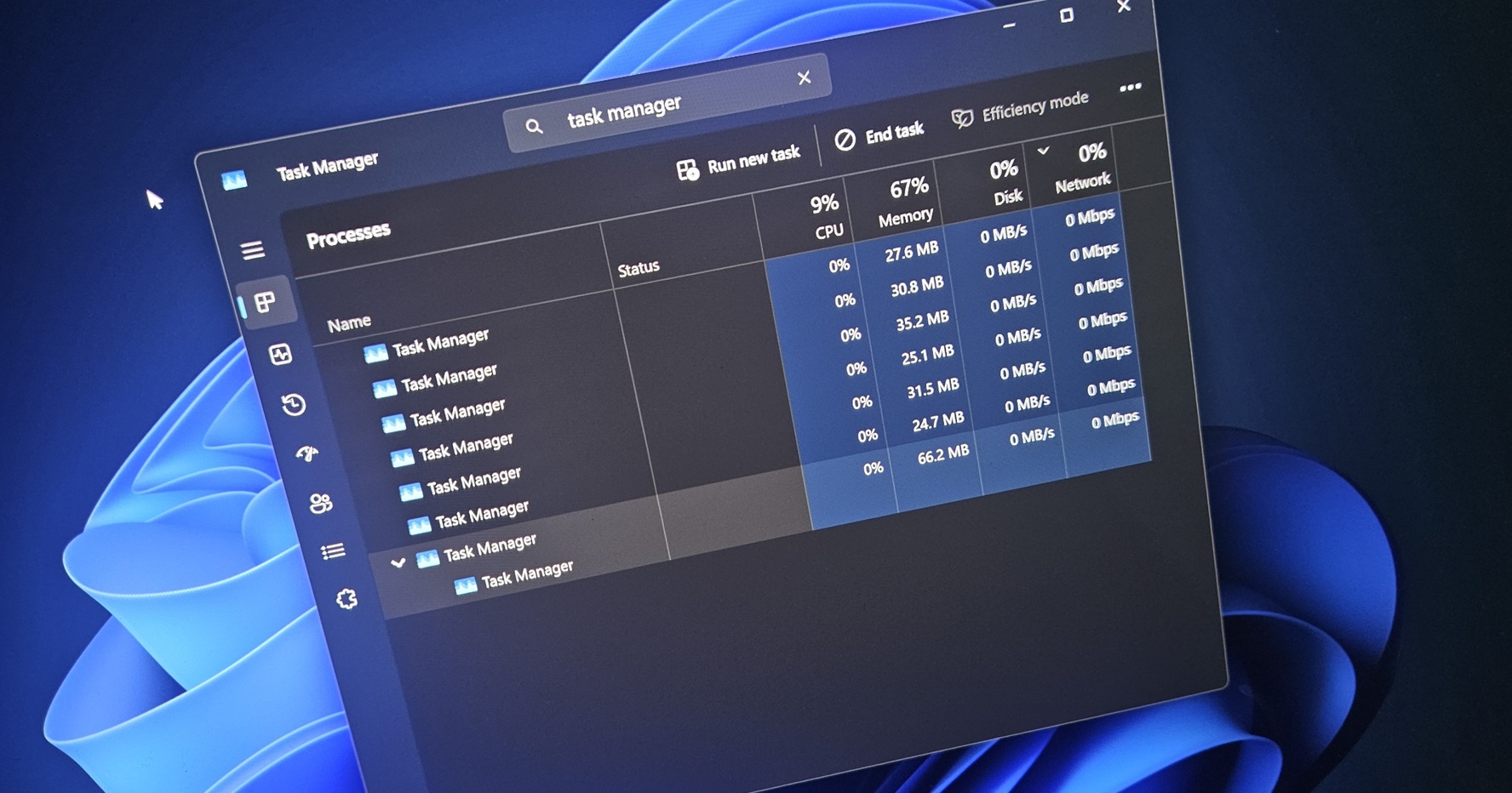
Same thread - a task manager bug spawning multiple instances. Make sure you have Sysinternals process manager available.
 
I've never quite understood the urge to change things just to change them, but this happens all the time. Camera menus are much the same - just a little change here and there without any change of function. Windows XP used to have a keyboard shortcut to shut down that was [window key] ,u,u. Then for some reason they changed it to [window key and X together],u,u. In Windows 11, not much is really changed, but nothing is where it used to be. And for some unaccountable reason, they narrowed the scroll bar on windows to about half its previous width, making it damned near impossible to pull down easily.

I'm reminded of a passage in a book I read long ago by an illustrator who often did advertising art, who found that managers can't stand to accept a thing as it is, and must take charge by changing something. So as not to mess his stuff up, he said he would always put in one glaring error that the manager could take credit for correcting. (Alexander King, an amusing writer if not a very reliable witness).
 
Why does Microsoft produce win 11 in a way that lots of computers cannot run it. Do they get paid by hardware manufacturers to make it necessary to get a new computer? I for one am not going to get a new computer for as long as possible because the one I have is perfectly good for my purposes. It runs streaming video and films with no problems.

As for the lock feature, I viewed it with extreme suspicion, and have been scared to click on it in case it locks my computer..
 
This is kind of funny (odd funny). I just tried to enroll for the Windows 10 Extended Security Updates and it failed with the message:

We can’t enroll you in Extended Security Updates right now ...​

I tried a few more times with the same result.

Then I consulted Google and someone suggested turning on "Find My Device" in Windows settings. It is hard to imaging why that would be necessary, but it was easy to try so I did it.

And it worked. I have now successfully enrolled for the ESU.
 
Do they get paid by hardware manufacturers to make it necessary to get a new computer?
No, it makes it easier for them and corporate buyers by increasing the security of the PC, and corporate buyers are their biggest market segment.

Of course an exploit was found so it's probably worth checking your BIOS is up to date if you have an older PC\Laptop
 
MS have released an emergency fix for the WinRE issue
Maybe the forced download is why my laptop seized up AGAIN just this morning. It happens about once a month -- everything just stops. Then I have to do a hard reset and hope I didn't lose any work.
 
A taskbar that won't un-hide after you let it autohide gets really annoying.

(I don't look at this thread much but I searched and didn't find a previous mention.)

On both my Dell home laptop (Win 11 from new) and HP work laptop since going to Win 11 the taskbar regularly fails to reappear when I mouse to the bottom of the screen. I thought a quick online search would find innumerable other sufferers but no, there seem to be bug complaints about autohide not activating at all or activating when it's switched off but my problem of the taskbar not reappearing seems to be rare. Yet both machines do it.
 
PS Today I Learned:

If your taskbar won't appear, <Alt>+<Tab> brings up all open apps and browser pages as tiles you can select from. Or you can hold <Alt> and tap <Tab> to step through them to the one you want.

Everyone else probably discovered this twenty years ago but <shrug>. Today I learned because Microsoft's bug made me.
 
PS Today I Learned:

If your taskbar won't appear, <Alt>+<Tab> brings up all open apps and browser pages as tiles you can select from. Or you can hold <Alt> and tap <Tab> to step through them to the one you want.

Everyone else probably discovered this twenty years ago but <shrug>. Today I learned because Microsoft's bug made me.

I learned about it back in my early Everquest days because I would have multiple game instances open. I use it for absolutely everything.
 
It gets better*

Previous version of outlook, if you want to alter the general settings, you click on "file, options" if you want to set the conditional formatting for messages, you get to them from the "view settings" option. In the new version you use the same "view settings" option for all settings.
It gets better still.

The new outlook doesn't have the "insert symbol" option, so you are forced to either use the character map or use the alt keys. Which is fine for me with a proper keyboard, but the laptop keyboard version is a pain that I had never needed to learn until now
 
PS Today I Learned:

If your taskbar won't appear, <Alt>+<Tab> brings up all open apps and browser pages as tiles you can select from. Or you can hold <Alt> and tap <Tab> to step through them to the one you want.

Everyone else probably discovered this twenty years ago but <shrug>. Today I learned because Microsoft's bug made me.
I use that often. But mostly when my laptop freezes up about once a month. At that point I can't tell if it's just slow processing something, the mouse battery has died, or it's downloading the monthly update (which is often the case, I think). So if Alt/Tab doesn't bring me to another window, I know it's cacked and I have to do a hard reset and restart.
 
It gets better still.

The new outlook doesn't have the "insert symbol" option, so you are forced to either use the character map or use the alt keys. Which is fine for me with a proper keyboard, but the laptop keyboard version is a pain that I had never needed to learn until now
Or just stop trying to insert symbols into emails. If it's important business information, there's probably a dedicated platform for it. And if it isn't? Why bother?
 
It gets better still.

The new outlook doesn't have the "insert symbol" option, so you are forced to either use the character map or use the alt keys. Which is fine for me with a proper keyboard, but the laptop keyboard version is a pain that I had never needed to learn until now
Could Power Toys Quick Accent do any of that? I have a vague memory of possibly tweaking a copy of it to do something.
 
Or just stop trying to insert symbols into emails. If it's important business information, there's probably a dedicated platform for it. And if it isn't? Why bother?
I'm an engineer, and it's something that is very easy in the previous version of outlook.

Yes I could write a report, but often email is the most efficient communication method. And seeing familiar symbols, like Å, μ, ε, or Ω, is the easiest way to communicate something without causing confusion
 
I'm an engineer, and it's something that is very easy in the previous version of outlook.

Yes I could write a report, but often email is the most efficient communication method. And seeing familiar symbols, like Å, μ, ε, or Ω, is the easiest way to communicate something without causing confusion
Efficient, but not definitive.
 
PS Today I Learned:

If your taskbar won't appear, <Alt>+<Tab> brings up all open apps and browser pages as tiles you can select from. Or you can hold <Alt> and tap <Tab> to step through them to the one you want.

Everyone else probably discovered this twenty years ago but <shrug>. Today I learned because Microsoft's bug made me.
You might also try Ctrl+Escape which pops up the start menu, but also (at least on my boxes) pops up the taskbar.
 
Seems like (as usual) the windoze users are having to 'learn new ways of doing things' anyway lol

I on the other hand have gone through several decades of Linux use without having had to learn a single new way of doing the same tasks lol

How strange, the one thing that windows users claim is its biggest advantage seems to not be the case at all.....
 
If you can get the taskbar to appear at all, you can right click it and get the taskbar settings, which might give you what is needed.
You can also get to Taskbar settings by opening the Settings app (available from the Start Menu) and type Taskbar in the search field. You get the same settings as right-clicking on the Taskbar.
 

Back
Top Bottom