• Quick note - the problem with Youtube videos not embedding on the forum appears to have been fixed, thanks to ZiprHead. If you do still see problems let me know.

Avoiding Win 11 and staying with 10

Efficient, but not definitive.
It isn't that there are no workarounds. It's that it's changed a minor frequent task and made it more annoying. The only benefit of the new outlook, is that the old version can run very slowly in windows 11.

The changing of the available colours (restricting to a set of muted colours rather than even 8 bit colour) is also a reduced functionality that is only mitigated by the fact that the other removed key functionality for conditional formatting means it's less important (highlighting emails from within the organisation, no longer works, for example).
 
Just pressing the Windows key does the same thing
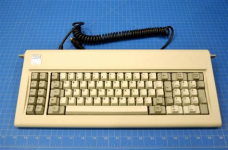
True. I frequently for about the Windows key shortcuts, I think because I held onto an old 3rd party keyboard for many years that has no Windows key. It had built in Macro capability that was not software dependent and some extra keys that worked really well with 5250 emulation, and I hated to give it up. I think I used that keyboard for more than 15 years before it died. After a while I had to use a DIN to PS2 adapter, and then later added a PS2 to USB adapter. I loved that keyboard.
 
JOAT is likely around the same age bracket as me then and had them long before they were 'cool gaming keyboards' lol

(I had the exact same thing, an IBM 83 key keyboard, with the 5 pin DIN plug on it (came with my first 386SX16), had mechanical keys and I kept it until well into the 20 teens.... first with a PS2 to 5 pin DIN adapter, and later with a USB to PS2 adapter (so adapters into adapters lol)

This kind of one
1762261855657.png
Wish I still had it....
 
Just pressing the Windows key does the same thing

I was going to say the same thing. I almost never manually search for things anymore. I just hit the windows key and start typing whatever it is I'm looking for and off I go. Outside of alt-tab and windows + R, I don't use many shortcuts. Given I know the short names for a bunch of programs those two things mean I almost never interact with the start menu.
 
JOAT is likely around the same age bracket as me then and had them long before they were 'cool gaming keyboards' lol

(I had the exact same thing, an IBM 83 key keyboard, with the 5 pin DIN plug on it (came with my first 386SX16), had mechanical keys and I kept it until well into the 20 teens.... first with a PS2 to 5 pin DIN adapter, and later with a USB to PS2 adapter (so adapters into adapters lol)

This kind of one
View attachment 65479
Wish I still had it....
I've used buckling spring keyboards, and while they're a nice solid piece of architecture, the keys are too heavy for my preference.
I can understand preferring them if the only other option is a membrane keyboard but beyond that I'm happy to stick with what I've got
 
Just pressing the Windows key does the same thing
I'm happy to confirm this works. So thanks again for the tip.

When mousing to the bottom of my screen refuses to unhide the taskbar, tapping the Windows key still pops up the start menu and taskbar. Indeed tapping it twice pops up then hides the start menu but leaves the taskbar working as it should again.
 
Flushed with that success how about fixing Outlook?

Old Outlook: Select an email from, say Jane Smith. Reorder your emails by "From" and it lists all of her emails to you in order. Nice.

New Outlook: Select an email from, say Jane Smith. Reorder your emails by "From" and it forgets Jane and flies instead to the top of the list showing you emails from Aaron Aardvark instead. Worse than useless.

(I believe there is no hidden setting to fix this. This madness is how Microsoft want it to behave now.)
 
Flushed with that success how about fixing Outlook?

Old Outlook: Select an email from, say Jane Smith. Reorder your emails by "From" and it lists all of her emails to you in order. Nice.

New Outlook: Select an email from, say Jane Smith. Reorder your emails by "From" and it forgets Jane and flies instead to the top of the list showing you emails from Aaron Aardvark instead. Worse than useless.

(I believe there is no hidden setting to fix this. This madness is how Microsoft want it to behave now.)
I haven't looked to see if you start typing "Jane" whether it goes to her name in the new outlook
 
I haven't looked to see if you start typing "Jane" whether it goes to her name in the new outlook
It does open a tiny dialogue box, inviting you to start typing the person's name.

It's a test: Were you thinking about the person's name, or were you only thinking about the info you're looking for in their previous emails?

So my problem with it is I often am not particularly thinking of the person's name at all. Or at least not their full name. Or how to spell it if it's more unusual than 'Jane Smith'. I'm thinking here's a new email from the rep from that company which does that job for us - let's just have a reminder of where we left things with the previous job... <click> Oh. Gone.
 
Last edited:
It does open a tiny dialogue box, inviting you to start typing the person's name.

It's a test: Were you thinking about the person's name, or were you only thinking about the info you're looking for in their previous emails?

So my problem with it is I often am not particularly thinking of the person's name at all. Or at least not their full name. Or how to spell it if it's more unusual than 'Jane Smith'. I'm thinking here's a new email from the rep from that company which does that job for us - let's just have a reminder of where we left things with the previous job... <click> Oh. Gone.
Testify.
 
It does open a tiny dialogue box, inviting you to start typing the person's name.

It's a test: Were you thinking about the person's name, or were you only thinking about the info you're looking for in their previous emails?

So my problem with it is I often am not particularly thinking of the person's name at all. Or at least not their full name. Or how to spell it if it's more unusual than 'Jane Smith'. I'm thinking here's a new email from the rep from that company which does that job for us - let's just have a reminder of where we left things with the previous job... <click> Oh. Gone.
They have been trialing the "new" Outlook for over a year - it's not that they don't know it isn't liked nor wanted, but apart from cosmetic changes they've hardly altered it in that time. It's typical of the Office teams - they create software that does what they do and want to foist that on enveryone. Indeed it's a problem across MS, even with Windows - it often feels like half the stuff they add only fits their way of working.

I suspect that they are going to be saying - "use co-pilot" for your searches etc. :(
 
It turns out I still have the option to use "Outlook (classic)" instead.

Good. New Outlook can ◊◊◊◊◊◊◊ do one.

Today is looking up.
Yes BUT.

I have both open every day now, because old outlook is sometimes very slow (to the point of being unusable) with the implementation of Windows 11 that we have at my work.
 
PS Today I Learned:

If your taskbar won't appear, <Alt>+<Tab> brings up all open apps and browser pages as tiles you can select from. Or you can hold <Alt> and tap <Tab> to step through them to the one you want.

Everyone else probably discovered this twenty years ago but <shrug>. Today I learned because Microsoft's bug made me.
More like thirty, back in W95.

One of these days you'll discover Win + Tab.....
 
Last edited:
Why does Microsoft produce win 11 in a way that lots of computers cannot run it.
Money.
Do they get paid by hardware manufacturers to make it necessary to get a new computer?
Not exactly.
I for one am not going to get a new computer for as long as possible because the one I have is perfectly good for my purposes. It runs streaming video and films with no problems.
If it's that old it'll soon stop getting security updates. And because a risk to others.
As for the lock feature, I viewed it with extreme suspicion, and have been scared to click on it in case it locks my computer..
:rolleyes:
 
Here’s an interesting one. A lot of installers for USB devices eg Steel series headphones let you gain admin on Windows. When the installer asks you to pick a location, right click the window and pick open powershell window here.
Yeah, that's an old trick.
 
A couple of replies seemed to imply that and it was an easy thing to block. Not really a windows programmer.
Oh it can be blocked, it was a standard part of the Windows configuration when I did large deployment projects.

Back in the old days you could unlock a locked Windows PC with a suitable autorun CD, or thumb drive.
 
It does open a tiny dialogue box, inviting you to start typing the person's name.

It's a test: Were you thinking about the person's name, or were you only thinking about the info you're looking for in their previous emails?

So my problem with it is I often am not particularly thinking of the person's name at all. Or at least not their full name. Or how to spell it if it's more unusual than 'Jane Smith'. I'm thinking here's a new email from the rep from that company which does that job for us - let's just have a reminder of where we left things with the previous job... <click> Oh. Gone.

I'm confused, I just use the search bar when looking for emails from a specific person or company. I've done that for the last however many versions. I didn't even know about the "from" thing.
 
When you just want their last few emails, it's a pop down click and done.

Easier than searching. Especially now search tries to be helpful with a list of things it reckons are important looking before a simple list in date order, which I just find confusing.
 
Oh it can be blocked, it was a standard part of the Windows configuration when I did large deployment projects.

Back in the old days you could unlock a locked Windows PC with a suitable autorun CD, or thumb drive.

Back in the old days, you could key anything you liked on a 'locked' Windows PC, and it would helpfully insert those key strokes into the active window behind the lock screen.

This is how "HELP! I'm being held captive by aliens in Area 51, Woomera, South Australia" turned up in a Dept of Defence document in Canberra.

(I'm not proud of that one. But who would have thought that the document would not be proof read by anyone?)
 
I've been using Outlook since it was released - bloody hell that was in 1997 - the new Outlook is the first update that removes significant features or significantly changes features. Even the introduction of the ribbon didn't fundamentally change it.

Saying that, I'm probably being a reactionary dinosaur and simply don't want change, not surprising given I've been using it for about 27 years!
 
I've been using Outlook since it was released - bloody hell that was in 1997 - the new Outlook is the first update that removes significant features or significantly changes features. Even the introduction of the ribbon didn't fundamentally change it.

Saying that, I'm probably being a reactionary dinosaur and simply don't want change, not surprising given I've been using it for about 27 years!
I started with Lotus Group Wise, then Outlook 97 which was a vast improvement. Then had the joy of Lotus Notes when I moved employers, before going back to Outlook. This new outlook has removed lots of functionality. As well as making lots of other needless changes to the UI.
 
Last week my old Dad was in a bit of a panic because he was no longer receiving email on his PC. Fortunately I was around to offer on-site support. He hadn't actively changed anything but "new" Outlook had been activated and for reasons I really didn't have the time or the expertise to diagnose his mail was misbehaving. Reverted him to classic Outlook and things were resolved in seconds.

I had an inkling that might be the problem because on an old Mac I keep in the mountains the latest Outlook steadfastly refuses to recognise my private mailserver, and sometimes gets arsey talking to gmail. Classic Outlook just does what it's told.
 
I rarely have to actively use Outlook -- I have all my stuff downloaded into Mozilla Thunderbird. Even my old Hotmail accounts (which I am weaning off of) still work, although oddly I can't seem to send OUT on those, unless I go to Outlook directly.
 
I rarely have to actively use Outlook -- I have all my stuff downloaded into Mozilla Thunderbird. Even my old Hotmail accounts (which I am weaning off of) still work, although oddly I can't seem to send OUT on those, unless I go to Outlook directly.
I've always used Thunderbird, but in recent versions they've made it virtually impossible to select multiple recipients for a single email. Or if it's not virtually impossible it's virtually impossible to figure out how to do something that used to be dead simple.
 
I started with Lotus Group Wise
Eww. Back in Ye Olde Days I think I did eight or nine projects that replaced that crap with Outlook.

, then Outlook 97 which was a vast improvement. Then had the joy of Lotus Notes
Eww. Awful crap.
when I moved employers, before going back to Outlook. This new outlook has removed lots of functionality. As well as making lots of other needless changes to the UI.
 
Last edited:
The Lotus Notes implementation I used at IBM Hursley was great. Integrated with IBM's CATS telephony products and other stuff including project servers. Then corporate took over. The axiom "Do not attribute to malice that which is adequately explained by stupidity " took a bit of a pounding.
 
The Lotus Notes implementation I used at IBM Hursley was great. Integrated with IBM's CATS telephony products and other stuff including project servers. Then corporate took over. The axiom "Do not attribute to malice that which is adequately explained by stupidity " took a bit of a pounding.
One of my brother's friends works for IBM, and he halfheartedly tried to claim to me that Lotus Notes wasn't that bad. Because my employer was Philips, which was quite large and bureaucratically complex, there were several different implementations of the various database options that Notes used.

I would be ready to be convinced that it's a decent database management system, but shoehorning email into it was pretty bad from my point of view.
 
I've always used Thunderbird, but in recent versions they've made it virtually impossible to select multiple recipients for a single email. Or if it's not virtually impossible it's virtually impossible to figure out how to do something that used to be dead simple.
It is still somewhat simple: just start typing. Of course you have to have individual addresses expand to a known address before starting on the next one. I agree this used to be a lot simpler by using semi-colons (I think)
 

Back
Top Bottom