• Quick note - the problem with Youtube videos not embedding on the forum appears to have been fixed, thanks to ZiprHead. If you do still see problems let me know.

Avoiding Win 11 and staying with 10

Efficient, but not definitive.
It isn't that there are no workarounds. It's that it's changed a minor frequent task and made it more annoying. The only benefit of the new outlook, is that the old version can run very slowly in windows 11.

The changing of the available colours (restricting to a set of muted colours rather than even 8 bit colour) is also a reduced functionality that is only mitigated by the fact that the other removed key functionality for conditional formatting means it's less important (highlighting emails from within the organisation, no longer works, for example).
 
Just pressing the Windows key does the same thing
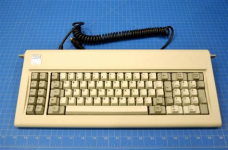
True. I frequently for about the Windows key shortcuts, I think because I held onto an old 3rd party keyboard for many years that has no Windows key. It had built in Macro capability that was not software dependent and some extra keys that worked really well with 5250 emulation, and I hated to give it up. I think I used that keyboard for more than 15 years before it died. After a while I had to use a DIN to PS2 adapter, and then later added a PS2 to USB adapter. I loved that keyboard.
 
JOAT is likely around the same age bracket as me then and had them long before they were 'cool gaming keyboards' lol

(I had the exact same thing, an IBM 83 key keyboard, with the 5 pin DIN plug on it (came with my first 386SX16), had mechanical keys and I kept it until well into the 20 teens.... first with a PS2 to 5 pin DIN adapter, and later with a USB to PS2 adapter (so adapters into adapters lol)

This kind of one
1762261855657.png
Wish I still had it....
 
Just pressing the Windows key does the same thing

I was going to say the same thing. I almost never manually search for things anymore. I just hit the windows key and start typing whatever it is I'm looking for and off I go. Outside of alt-tab and windows + R, I don't use many shortcuts. Given I know the short names for a bunch of programs those two things mean I almost never interact with the start menu.
 
JOAT is likely around the same age bracket as me then and had them long before they were 'cool gaming keyboards' lol

(I had the exact same thing, an IBM 83 key keyboard, with the 5 pin DIN plug on it (came with my first 386SX16), had mechanical keys and I kept it until well into the 20 teens.... first with a PS2 to 5 pin DIN adapter, and later with a USB to PS2 adapter (so adapters into adapters lol)

This kind of one
View attachment 65479
Wish I still had it....
I've used buckling spring keyboards, and while they're a nice solid piece of architecture, the keys are too heavy for my preference.
I can understand preferring them if the only other option is a membrane keyboard but beyond that I'm happy to stick with what I've got
 
Just pressing the Windows key does the same thing
I'm happy to confirm this works. So thanks again for the tip.

When mousing to the bottom of my screen refuses to unhide the taskbar, tapping the Windows key still pops up the start menu and taskbar. Indeed tapping it twice pops up then hides the start menu but leaves the taskbar working as it should again.
 
Flushed with that success how about fixing Outlook?

Old Outlook: Select an email from, say Jane Smith. Reorder your emails by "From" and it lists all of her emails to you in order. Nice.

New Outlook: Select an email from, say Jane Smith. Reorder your emails by "From" and it forgets Jane and flies instead to the top of the list showing you emails from Aaron Aardvark instead. Worse than useless.

(I believe there is no hidden setting to fix this. This madness is how Microsoft want it to behave now.)
 
Flushed with that success how about fixing Outlook?

Old Outlook: Select an email from, say Jane Smith. Reorder your emails by "From" and it lists all of her emails to you in order. Nice.

New Outlook: Select an email from, say Jane Smith. Reorder your emails by "From" and it forgets Jane and flies instead to the top of the list showing you emails from Aaron Aardvark instead. Worse than useless.

(I believe there is no hidden setting to fix this. This madness is how Microsoft want it to behave now.)
I haven't looked to see if you start typing "Jane" whether it goes to her name in the new outlook
 
I haven't looked to see if you start typing "Jane" whether it goes to her name in the new outlook
It does open a tiny dialogue box, inviting you to start typing the person's name.

It's a test: Were you thinking about the person's name, or were you only thinking about the info you're looking for in their previous emails?

So my problem with it is I often am not particularly thinking of the person's name at all. Or at least not their full name. Or how to spell it if it's more unusual than 'Jane Smith'. I'm thinking here's a new email from the rep from that company which does that job for us - let's just have a reminder of where we left things with the previous job... <click> Oh. Gone.
 
Last edited:
It does open a tiny dialogue box, inviting you to start typing the person's name.

It's a test: Were you thinking about the person's name, or were you only thinking about the info you're looking for in their previous emails?

So my problem with it is I often am not particularly thinking of the person's name at all. Or at least not their full name. Or how to spell it if it's more unusual than 'Jane Smith'. I'm thinking here's a new email from the rep from that company which does that job for us - let's just have a reminder of where we left things with the previous job... <click> Oh. Gone.
Testify.
 
It does open a tiny dialogue box, inviting you to start typing the person's name.

It's a test: Were you thinking about the person's name, or were you only thinking about the info you're looking for in their previous emails?

So my problem with it is I often am not particularly thinking of the person's name at all. Or at least not their full name. Or how to spell it if it's more unusual than 'Jane Smith'. I'm thinking here's a new email from the rep from that company which does that job for us - let's just have a reminder of where we left things with the previous job... <click> Oh. Gone.
They have been trialing the "new" Outlook for over a year - it's not that they don't know it isn't liked nor wanted, but apart from cosmetic changes they've hardly altered it in that time. It's typical of the Office teams - they create software that does what they do and want to foist that on enveryone. Indeed it's a problem across MS, even with Windows - it often feels like half the stuff they add only fits their way of working.

I suspect that they are going to be saying - "use co-pilot" for your searches etc. :(
 
It turns out I still have the option to use "Outlook (classic)" instead.

Good. New Outlook can ◊◊◊◊◊◊◊ do one.

Today is looking up.
Yes BUT.

I have both open every day now, because old outlook is sometimes very slow (to the point of being unusable) with the implementation of Windows 11 that we have at my work.
 
PS Today I Learned:

If your taskbar won't appear, <Alt>+<Tab> brings up all open apps and browser pages as tiles you can select from. Or you can hold <Alt> and tap <Tab> to step through them to the one you want.

Everyone else probably discovered this twenty years ago but <shrug>. Today I learned because Microsoft's bug made me.
More like thirty, back in W95.

One of these days you'll discover Win + Tab.....
 
Last edited:
Why does Microsoft produce win 11 in a way that lots of computers cannot run it.
Money.
Do they get paid by hardware manufacturers to make it necessary to get a new computer?
Not exactly.
I for one am not going to get a new computer for as long as possible because the one I have is perfectly good for my purposes. It runs streaming video and films with no problems.
If it's that old it'll soon stop getting security updates. And because a risk to others.
As for the lock feature, I viewed it with extreme suspicion, and have been scared to click on it in case it locks my computer..
:rolleyes:
 

Back
Top Bottom