• Quick note - the problem with Youtube videos not embedding on the forum appears to have been fixed, thanks to ZiprHead. If you do still see problems let me know.

Windows 10

Where does it mention using your bandwidth to serve other people installing Windows 10?

Well you didn't make it clear which bit you were talking about...

Perhaps my experience is different being on the preview track but by default on my set up it was not enabled to share internet bandwidth just with other local network PCs.
 
I couldn't say for sure what it said, but I'm pretty sure I was told about sharing bandwidth during some part of the setup.
 
When? It was set up on mine, I don't recall being asked.

There's enough in Darat's screenshot to be concerned about privacy that made me select "customize", even if I haven't read the FUD articles before.

Things like "automatically connect to trusted hotspots" let my hair stand on end how anyone could recommend anything like that, but at least they point out that this can be problematic.

So yes, the pre-selected options MS gives us are bad, from a privacy and security standpoint.

But... they tell us before, in a rather short, concise text. No, it doesn't point out all settings to keep it concise.

The only thing I think could be called backhanded is the fact that they do not make the "customize" option on par with the "express settings". There should have been two buttons on the bottom, one labeled "customize (recommended)", and one "express".

But they have done similar things before (like the account setting in Windows 8 to set it up with a local account only, without a Microsoft ID). So I wasn't too surprised.
 
Last edited:
There's enough in Darat's screenshot to be concerned about privacy that made me select "customize", even if I haven't read the FUD articles before.

Things like "automatically connect to trusted hotspots" let my hair stand on end how anyone could recommend anything like that.

...snip...

It's how the world has moved on, it's a common "feature" on mobile devices, think of it as an old fashioned "automatically connect to your trusted lan" and you'll see if isn't really anything new.
 
You're okay with MS leeching your bandwidth to serve updates to random PCs on the net? (In my country, bandwidth is pretty much always metered, so this is not okay with us.) You're okay with MS monetizing your data for targeted advertising? You're okay with the fact that everything of yours that you allow to land on their servers basically belongs to them? (And they want all your information and data on their servers.)
The moral behind my response is that if you're savvy enough to look at the options provided during the install, you can largely disable the data sharing on your personal stuff. And most of the settings can be turned off after the fact. I cared enough to actually disable all of the tools i felt were too intrusive during the upgrade... so no i dont like M$ having an all you can eat buffet on my personal information.

Its when people dont take the time to sift through them that these features can more easily capitalize.

Having said that, if youre still concerned about privacy, and dont want to upgrade im not going to tell you that you should upgrade. It is quite apparent that more and more people cant be careless if they want 3rd parties to not snoop on them
 
Last edited:
It's how the world has moved on, it's a common "feature" on mobile devices, think of it as an old fashioned "automatically connect to your trusted lan" and you'll see if isn't really anything new.

Yes, but people need to be taught to handle such options with care. I have my iPad set to automatically connect to two wifis only, my own, and my workplace's one. I don't set it up to connect automatically to the ones at McDonald's, or the airport (which I have used, cautiously and occasionally).
 
Well you didn't make it clear which bit you were talking about...

Perhaps my experience is different being on the preview track but by default on my set up it was not enabled to share internet bandwidth just with other local network PCs.

I think of myself as fairly savvy, went the custom settings route during setup, and didn't see it mentioned; when I did learn about it, it was set to internet-wide by default.

On the other hand, I'm pretty happy about the local-network-only option, so it's not all bad.
 
Also, too late to add to my last post, but I'm really liking the now-default 'windows don't have borders' style. Even existing prograpps look fresher.
 
Yes, but people need to be taught to handle such options with care. I have my iPad set to automatically connect to two wifis only, my own, and my workplace's one. I don't set it up to connect automatically to the ones at McDonald's, or the airport (which I have used, cautiously and occasionally).
Don't get me wrong I can see the concerns in regards to security, just pointing out that it's more of a change of user behaviour that Windows (on Pcs) is catching up with rather than something MS is fostering on to people.
 
Another interesting behaviour following the Windows 10 upgrade.

When the old Tosh is put to sleep by closing the lid, it cannot establish a wi-fi connection when woken up (no error message, it just fails to establish the connection) - I have to reboot.
 
Last edited:
When I click on the start button, the tile for the Photos folder automatically started a slideshow of the images in my folder.

Steve S


This isn't exactly what I had in mind when the post I responded to talked about "screensavers.

On an unrelated note, to show how much I use, care about, or pay attention to tiles (which is to say, "None at all") I never noticed that that tile was behaving that way until you pointed it out.
 
So, turns out that if you delete the default 'downloads' folder because you already have a perfectly good one elsewhere, it's literally impossible to download files in Edge. I'm still not going to downgrade, but it is starting to feel a little like I'm being punished for my eagerness.
 
Updated two PCs. No issues to report. All my custom settings carried over and my desktop screen looks mostly the same. The differences are easy to figure out and I seem to be running a bit faster.
 
So, turns out that if you delete the default 'downloads' folder because you already have a perfectly good one elsewhere, it's literally impossible to download files in Edge. I'm still not going to downgrade, but it is starting to feel a little like I'm being punished for my eagerness.
You know that old saw: No good deed goes unpunished. :)
 
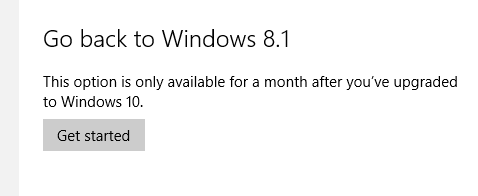
Only just noticed this:
rollback.png


I'll be interested to see if I suddenly get back a few gig of disk space in three weeks.
 
Comfyslippers: That W10 is supposedly the final version of Windows is reason to prod people into adopting it so that everyone has one experience on their devices.
Is that like saying this is the final JFK murder show?
 

Back
Top Bottom