USB-C. A trip into hell. Oh, we've been here already.
USB 1, 2, 3. It's USB. Buy a cable, it works. USB 3 get's a little complicated. Just buy the cable with the blue bit at the end and it's fast.
Now USB-C offers speed and power....but......
The USB-C connector and USB-C speed and USB-C power are all different things. You can get a cable that doesn't do much and cables that do more but how to tell.
The USB-C power distribution has a protocol it negotiates. How do you know what it's negotiated or rejected? You can buy a $100 gizmo that will track it all and tell you why it's not working. Cheaper devices will tell you what power being carried is.
The USB speed only seems to have lab grade equipment available.
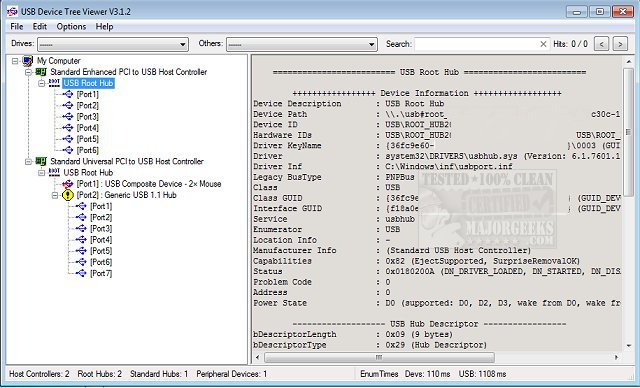
After days of poking around I found USB-tree that tells me the speed protocol it is using, not the actual speed it is operating at. Normal or super speed. At least I know now what it is capable of.
USB Device Tree Viewer is a small application designed to display detailed information on the USB device tree. This utility quickly displays information for all the USB hubs and ports, beginning with connections status, device information, and all relative connection information.
www.majorgeeks.com
Microsoft has usbview but it is cryptic and doesn't list all the information.
Cables that do both cost a lot more and are a lot thicker, which makes sense.
A high power cable by default will only operate at USB-2 speeds. In fact USB-C off the shelf with no labelling will only run at USB-2 speeds despite being a USB-C connector. If you want higher speed you have to get super speed cable that's also high power but that's still got to be negotiated by the power supply or docking station itself.
Don't confuse high speed with super speed.
Connecting the list of ports that you can see to the ports on the report can be tricky.
=========================== USB Port3 ===========================
Connection Status : 0x01 (Device is connected)
Port Chain : 1-2-3
Properties : 0x01
IsUserConnectable : yes
PortIsDebugCapable : no
PortHasMultiCompanions : no
PortConnectorIsTypeC : no
ConnectionIndex : 0x03 (Port 3)
CompanionIndex : 0
CompanionHubSymLnk : USB#VID_2109&PID_0817#MSFT30000000000#{f18a0e88-c30c-11d0-8815-00a0c906bed8}
CompanionPortNumber : 0x03 (Port 3)
-> CompanionPortChain : 1-18-3
========================== Summary =========================
Vendor ID : 0x2109 (VIA Labs, Inc.)
Product ID : 0x2817
Manufacturer String : "VIA Labs, Inc. "
Product String : "USB2.0 Hub "
Serial : *ERROR* iSerial=3 but String Descriptor not found
USB Version : 2.1 (480 Mbit/s)
Port maximum Speed : High-Speed (Companion Port 1-18-3 is doing the SuperSpeed)
Device maximum Speed : High-Speed (Companion Hub at 1-18-3 is doing the SuperSpeed)
Device Connection Speed : High-Speed
Self powered : yes
Demanded Current : 0 mA
Used Endpoints : 2