
• Quick note - the problem with Youtube videos not embedding on the forum appears to have been fixed, thanks to ZiprHead. If you do still see problems let me know.

Sneaky spyware!

richardm

Philosopher
Joined
Aug 6, 2001
Messages
9,248
Hmm... Just had this appear as a pop-under window while browsing. It didn't look familiar at all, but it sure looked plausible:
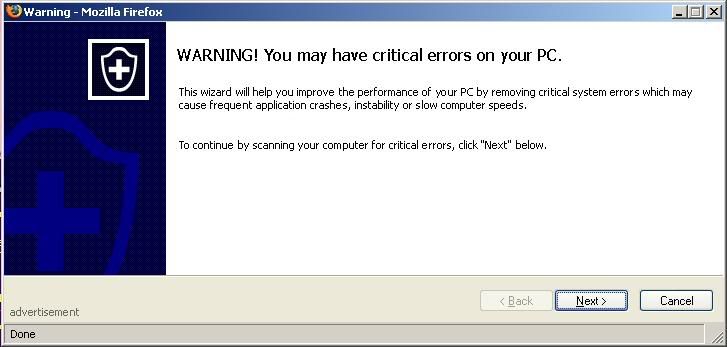
warning.jpg


Just that little word "Advertisement" gave it away. Mousing over the "Next" button (without clicking!) showed a c.casalemedia.com URL.

I wonder how many people just go ahead and click. A fair number, I'd think.

Anyway. I thought Firefox was supposed to prevent popups?
 
Be aware that even doing the rollover thing and checking the address line can also be spoofed. I got an email from a local bank requesting account information. Did the rollover and checked the link. Opened another window and typed it in manually, and it took me to the valid site.

Out of curiosity I went back to the email and clicked it and sure enough, a window came up asking for account verification information. However, when I checked History, the address link was totally different from the one shown on the rollover. I didn't know they could do that.

I only did it because I don't even have an account at that bank. But I guess I was at risk of getting a virus or something, so I don't do that any more.
 
richardm said:


Anyway. I thought Firefox was supposed to prevent popups?

Can be beaten with javal script.

My uni doesn't run popup blockers. Judging by the ones I see when acess from uni popups have been getting a lot nastyer in the last few mounths. A lot are now trying to trick people rather than simply advertise.
 
also, be aware that you may already have spyware

It appears that some spyware-removal sofware companies actually sneak some components into your computer (and I don't know the mechanics of this) while you are browsing third-party sites. They, in effect, create stuff on your computer which they then proceed to warn you to remove!

Try 'SPYBOT, Search & Destroy' which I found to be effective, and Free.
 
Re: also, be aware that you may already have spyware

webfusion said:
Try 'SPYBOT, Search & Destroy' which I found to be effective, and Free.
I have great results with a combo of spybot and AdAware Personal. Each tends to catch the things the other cant.
 
I have two Compaq / HP computers. Each one was shipped with spyware. The stuff they collected wasn't linked to personal information but it still ticked me off mightily.
 
When I bought my HP, it had Windows ME (possibly the worst excuse for an OS ever) - finally I'd had enough and upgraded to XP. Although itself takes up more space, just by default it apparently deleted a lot of pre-loaded junk that came w/the PC...and I actually GAINED about 5GB.

:mad: POSs
 
richardm said:
Anyway. I thought Firefox was supposed to prevent popups?

There was a recent article on how the popup-blocker could be blocked in Firefox by a suitable javascript code.

Still, I've been on the Internet for 10.5 years and I've seen exactly two popups (and both of them several years ago).

My solution: turn off javascript and plugins.
 
alfaniner said:
Be aware that even doing the rollover thing and checking the address line can also be spoofed. I got an email from a local bank requesting account information. Did the rollover and checked the link. Opened another window and typed it in manually, and it took me to the valid site.

Out of curiosity I went back to the email and clicked it and sure enough, a window came up asking for account verification information. However, when I checked History, the address link was totally different from the one shown on the rollover. I didn't know they could do that.

I only did it because I don't even have an account at that bank. But I guess I was at risk of getting a virus or something, so I don't do that any more.

That spoof has been around since last year from what I have read over at the AntiPhishing groups.

Basically somebody programs a Javascript whitebox to cover your browsers address bar so you get tricked into thinking it is the real URL.

Also, when it comes to Spyware, no program is better than:

Webroot Spy Sweeper

It's caught alot of stuff taht Ad-Aware and SpyBot Search & Destroy hasn't caught. Plus they send updates out more frequently then the two aformentioned programs. The only downside however is you'll have to pay $20.00 (look for the cupon code) for an antispyware subscription to keep getting new definitions.

The first thirty days are free however, so it does turn out being well worth it for that time period even.
 
The best solution is to block the adware/spyware sites via the hosts file. That way, you never see the annoying ads and their junk doesn't install itself on your computer. When you run the tests with spybot or adware, it will be rare that they ever find anything.

http://www.mvps.org/winhelp2002/hosts.htm
 
I've also heard that getting a hardware blocker (VPN or whatever its' called) along with a software blocker is extremely effective. Costs a chunk of change, but they're coming down in price too....I believe you can get em in the $50-75 range.
 
I use, firefox and adblock

http://adblock.mozdev.org/

You have to be a bit computer-nerdy to install and configure Adblock though.

With the entry *popunder* in my list of filters I still get the window but it is empty.

Firefox will stop popups, it's popunders it dosn't stop, (yet). Now it's becoming a problem I'm sure it will be addressed.

O.
 
Instead of disabling javascript, I just disable a few of its features. This helps stop some other annoying things. For instance, some websites don't let you right-click on their pictures so that you can't save them to your computer. They can accomplish this by replacing the context menu with a copyright notice.

advancedjvs.png
 
ma1ic3 said:
Instead of disabling javascript, I just disable a few of its features. This helps stop some other annoying things. For instance, some websites don't let you right-click on their pictures so that you can't save them to your computer. They can accomplish this by replacing the context menu with a copyright notice.
And for those I just to a print-screen and crop it down anyway. :)
 
ma1ic3 said:
Instead of disabling javascript, I just disable a few of its features. This helps stop some other annoying things.

That's useful, Ma1ic3, thanks!
 
Wudang said:

Howes didn't test the anti-adware programs in the above list against a program called CoolWebSearch (CWS). This little bugger mutates every few days, it seems. CWS actually requires a completely separate anti-adware program, CWShredder, which is constantly evolving along with the nuisance. This is explained in more detail later in this article.

CWS is an amazing little ***. It requires a whole area of expertise, and is the hardest one of all to remove. RTA and kill it, and you will probably find that, after you have run the other Spy Ware removers such as spybot, the rest of you spyware is gone.
 

Back
Top Bottom