• Quick note - the problem with Youtube videos not embedding on the forum appears to have been fixed, thanks to ZiprHead. If you do still see problems let me know.

Can anyone help?

Sabrina

Wicked Lovely
Joined
Jul 25, 2007
Messages
9,810
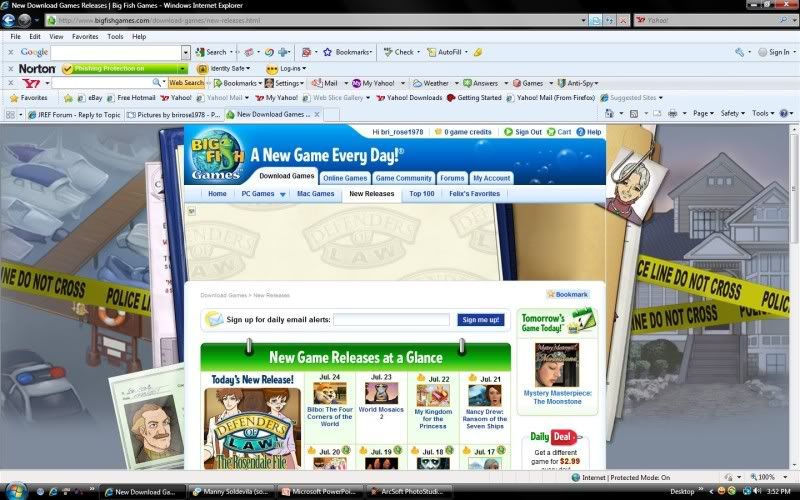
I'm having an issue with IE8. Unless I am on the main website, I cannot view Youtube videos (such as the ones often linked here in the Youtube tags); all I get is a blank screen. I have encountered the same issue with certain picture files as well on websites I have visited in the past with no problem (most notably a website I check every day; Big Fish Games new games calendar). I have reset IE to default settings and have run every scan I can think of on my computer, all to no avail. I'm on the verge of uninstalling IE8 and redownloading it through Firefox to see if that will fix the issue, but I thought I might ask for help here first to see if anyone has any ideas.

Of note, I had an issue several months ago that has since resolved itself (I don't believe anything I did fixed it) with IE8 (it's what prompted me to download Firefox to begin with) with the Java add-on, where I could not run Javascript windows via Pogo.com and some other websites. I'm not sure what resolved the problem, but I can't help but wonder if this issue is something along the same lines; however, I don't want to wait for it to resolve itself right now. Does anyone have any ideas? Bear in mind, I'm somewhat computer illiterate; I know the basics, but I am by no means fluent in any programming languages or well versed with the technicalities of how my computer runs. Layman speak only if possible; thanks!
 
Layman's terms:
IE8 is an open door to malware.
Keep using Firefox.
 
Guy who just fixed my computer told me to download Chrome. I use Firefox. Whatchu think of Chrome?

BTW stoopid question: just switched to the latest version of Firefox... but now my drop-down bookmarks don't drop down, I have to go to the B ookmarks button and select manually. How to fix?
 
I've reinstalled Flash I don't know how many times, so that isn't it.

I've tried Firefox; it's all right, but I still prefer IE8. Which is why I'd like to fix it, if possible.
 
Sabrina, there is a security setting that refers to displaying content in iframes.

I do not have an IE8 machine booted at the moment, but that should give you enough to google on. If not, let me know, and I will down one of my machines after I am not streaming out programs and find it for you.

-Ben
 
Guy who just fixed my computer told me to download Chrome. I use Firefox. Whatchu think of Chrome?

BTW stoopid question: just switched to the latest version of Firefox... but now my drop-down bookmarks don't drop down, I have to go to the B ookmarks button and select manually. How to fix?
.
Mine drop down when I pick them off the menu.
I've never seen them do anything, nor would I want to, I think.
 
I've reinstalled Flash I don't know how many times, so that isn't it.

I've tried Firefox; it's all right, but I still prefer IE8. Which is why I'd like to fix it, if possible.

IE8 is sort of buggy, I took it off my home machine and stick with IE7. You could try uninstalling it and reinstalling it.
 
This sounds a little like there may be a security setting getting in the way. Sabrina, can you post a screen-shot of what you're getting when you try to view a video? You may have one of the various IE security filters (new to IE 8) enabled or you may have one of the add-ons disabled (in IE 7, this means a plugin or ActiveX control turned off).

First thing I would suggest (provided this isn't a work computer) is to try to check Windows (or Microsoft) Update. You can get there either through your Start Menu or by clicking the "Safety" menu in IE 8 and selecting "Windows Update" in the list. Make sure it checks for updates, using "Custom" for your search, and there will be a list of non-critical updates to choose from. If possible, list all of the non-critical updates you have to choose from here-- one of those may address the issue and I will be able to better tell by knowing what's missing.
 
screenshot.jpg


Sorry if it's big; that's what I keep seeing for Youtube videos, except on the Youtube site itself. Here's one for what appears to be a picture embedded into a website:

screenshot2.jpg


I've tried playing around with the security settings and it doesn't seem to be doing much of anything. I did try uninstalling and reinstalling IE8 with no luck, but I may have done it wrong. Let me know if you can think of anything Gren; I'd really appreciate the help.

ETA: Forgot to mention; the only optional update I currently have listed is this: Agere-Network-Agere Systems PCI-SV92PP Soft Modem. I have no required updates listed; I tend to install them the second I see them.
 
Last edited:
Hmmm, sorry that the uninstall and reinstall did not work. :(

I notice that you have a lot of toolbars in your window, does Yahoo, Google or Norton have s etting that could be blocking? (I know, that is a bite to go through).

Just out of curiousity, do you use the Yahoo toolbars because I find it to be a huge nuisance on the machines at work. It downloads stuff, it slows things down and just goobers up connectivity.

Do you run the other MS Updates for your machine? (It is good to use optional, then you can avoid Windows Live, Powershell and Silverlight)
 
I don't THINK so... I've had all three of those toolbars for some time, and the problem didn't manifest itself when I installed any of them. Although I have downloaded updates to the Yahoo and Google toolbars that could, I suppose, have caused an issue, if I could figure out how.

This is my home PC, not my work PC, BTW. And yes, I do use it, because my primary email address is through Yahoo mail, so I find it useful to have up there. I do internet searches primarily through the Google one, and the Norton one has to do with my antivirus protection.
 
[qimg]http://i95.photobucket.com/albums/l129/brirose1978/screenshot.jpg[/qimg]

Sorry if it's big; that's what I keep seeing for Youtube videos, except on the Youtube site itself. Here's one for what appears to be a picture embedded into a website:

[qimg]http://i95.photobucket.com/albums/l129/brirose1978/screenshot2.jpg[/qimg]

I've tried playing around with the security settings and it doesn't seem to be doing much of anything. I did try uninstalling and reinstalling IE8 with no luck, but I may have done it wrong. Let me know if you can think of anything Gren; I'd really appreciate the help.

ETA: Forgot to mention; the only optional update I currently have listed is this: Agere-Network-Agere Systems PCI-SV92PP Soft Modem. I have no required updates listed; I tend to install them the second I see them.

Okay, good. The updates part doesn't seem to be the issue, and I would have doubted the IE8 uninstall/reinstall anyway because that process doesn't really "uninstall" the browser. However, what it looks like you're getting is a script-blocking and not simply something blocking Flash from running. I'm assuming that if you go to this page that you get the flash animation (turn down your speakers) when the page loads. Could you confirm?
 
Have you tried doing a browser reset? Close any browser windows, go to control panel--> Internet options. Advanced tab, reset, and have it delete personal settings.
 
Okay, good. The updates part doesn't seem to be the issue, and I would have doubted the IE8 uninstall/reinstall anyway because that process doesn't really "uninstall" the browser. However, what it looks like you're getting is a script-blocking and not simply something blocking Flash from running. I'm assuming that if you go to this page that you get the flash animation (turn down your speakers) when the page loads. Could you confirm?

Yes, I get the animation.

@ Yalius: Tried that, didn't seem to work. Although perhaps I was just resetting my security settings; I'm not a hundred percent sure.
 
Yes, I get the animation.

@ Yalius: Tried that, didn't seem to work. Although perhaps I was just resetting my security settings; I'm not a hundred percent sure.

Okay, you get the animation, so it's not embedded Flash that's being blocked, it's scripts that may be used along with Flash, particularly with Flash video.

Next step: Can you identify installing any other software aside from IE 8 correlating with the time when Flash video stopped working for you? Also, if you are aware of how to do it, I suggest temporarily disabling the Norton protection in your browser and attempting to see if YouTube works for you.
 
Agreed. And go into Internet Preferences in the control panel and temporarily reset to default settings. I just booted an XP VM with IE8 and no other layers and was unable to make it fail in that way when I set all settings to the most paranoid, so its still a bit of a mystery to me.
 
Honestly, the only software I've installed recently is games.

Norton didn't do this when I first installed it (but I will try checking the browser settings), and aside from the games I download from Big Fish Games, Firefox version 3.5 is the only software I've downloaded and installed recently.

I'll report back tomorrow evening with any results of tests; I have to go to bed now. Thanks for the help so far! :)
 
I tried disabling my firewall temporarily; didn't work.

I'm still unsure of exactly when this started happening; my best guess is about two months ago. In that time, I've pretty much only installed games, barring the LiveUpdate which runs on its own. I have done a couple of required system update installations, I think, and may have done one optional update in that time, however; but I'm not sure how to check that.
 

Back
Top Bottom