• Quick note - the problem with Youtube videos not embedding on the forum appears to have been fixed, thanks to ZiprHead. If you do still see problems let me know.

Avoiding Win 11 and staying with 10

I can understand if your computer can't be upgraded but if it can why would you want to stick with 10?
 
I can understand if your computer can't be upgraded but if it can why would you want to stick with 10?

I HATE CHANGE!!! The new one is always worse than the old: the old one was better!!

(Until I'm used to the new one and it becomes the old one and is due to be replaces with a new, new one. Then I want the old new one, not the old, old one, as the old, new one is now best and the new, new one is intimidating and confusing and unnecessary. Repeat and add version number ad infinitum)
 
That's really strange, surprised there is an incompatiblly between 10 and 11. Have you tried running them as Win 10?
 
That's really strange, surprised there is an incompatiblly between 10 and 11. Have you tried running them as Win 10?
You mean running them on the new one as Win 10? Never thought of that this time around, even though previously I had success at doing Compatibility mode for those programs. I may have to try that. As it is, every time I go to a new laptop it's a minimum of three weeks before I get all my programs installed and everything the way I like it.
 
Windows versoin changes annoy me as they do stupid random things, at least from my POV. For example in Win 11 the small right-click context menu with most of the things I want now moved (e.g. rename) or moved to "more options". Sure I can fix it with WinAero or regedit but it's the to me whimsical way they change.
More obscure - at some point the IsWindowVisible() method would tell you if a window was visible. Now it tells a Window may be visible or not depending on the style from GetWindowLongPtrA(hWnd, GWL_STYLE) and comparing that to an enum.
 
Medical devices. It's generally desirable to keep them current on security updates, without making any feature updates to the OS.
Not just desirable, absolutely mandatory. Some medical software/systems are certified only on a specific OS platforms and even hardware. Change either and the certifications are voided. Voided certification is a sure and certain way to legal nightmares and giant insurance payout figures in the medical field.
 
I HATE CHANGE!!! The new one is always worse than the old: the old one was better!!
You obviously never had WinME. :)

That said, my PC keeps bugging me for the free upgrade to 11 and I always ignore it. Last job had 11 and I hated it. It offered nothing that was better.
 
Windows versoin changes annoy me as they do stupid random things, at least from my POV. For example in Win 11 the small right-click context menu with most of the things I want now moved (e.g. rename) or moved to "more options". Sure I can fix it with WinAero or regedit but it's the to me whimsical way they change.
More obscure - at some point the IsWindowVisible() method would tell you if a window was visible. Now it tells a Window may be visible or not depending on the style from GetWindowLongPtrA(hWnd, GWL_STYLE) and comparing that to an enum.
Reminds me of Mac developers back in the day. They'd exploit undocumented functionality, and then get rug-pulled when Apple closed the loophole and admonished them for going off book.
 
Reminds me of Mac developers back in the day. They'd exploit undocumented functionality, and then get rug-pulled when Apple closed the loophole and admonished them for going off book.
No. If you had thought for a second you would have considered what the IsWindowVisible() might do. Perhaps to quote the documented functionality it "Determines the visibility state of the specified window." It used to do that. As I said.
I avoid undocumented functionality apart from once when writing signon code for older CICS system I used an undocumented (externally) call to DFHSNP as there was no alternative.
 
You mean running them on the new one as Win 10? Never thought of that this time around, even though previously I had success at doing Compatibility mode for those programs. I may have to try that. As it is, every time I go to a new laptop it's a minimum of three weeks before I get all my programs installed and everything the way I like it.
I install many programs on D:\Apps, as most will make their registry entries upon first run if these are missing. This is along with a great many portable apps, and I maintain shortcuts to all the apps using my preferred classic menu structure. An OS reinstall is then often reduced to copying the shortcuts to C:\ProgramData\Microsoft\Windows\Start Menu and updating the OS.
 
We've been moving all of our end users over to 11. So far no real issues, just the random complaints about things being different. We haven't run into any issues with our software not working, which was a concern of ours.
 
The only thing I don't like about Win11 is the task bar is no longer moveable. Something about the new UI contract not including functionality to place it anywhere except across the bottom of your screen. Which seems pants-on-head-retarded to me, but it's a minor peeve in the grand scheme.
 
I can understand if your computer can't be upgraded but if it can why would you want to stick with 10?
Because Win 11 buys you nothing and if anything is worse (for ex. how in File Manager, you have to click "more options" to see common options now)?
 
Winaero is a must-have, Classic Shell is one way to get Win95-Win7 menus back. In short, there are myriad tools and registry hacks to make Win11 indistinguishable from Win10, using even earlier UI elements.
 
Because Win 11 buys you nothing and if anything is worse (for ex. how in File Manager, you have to click "more options" to see common options now)?

Yeah that pissed me off. Stupid tweak making assumptions (IMHO) about what operations users use right-click for.
Anyway I fixed that and a couple of other minor things with Winaero.

By File Manager/FM I'm assuming you are meaning "File Explorer"? If so which common options aren't on the first right-click menu in File Explorer?
 
By File Manager/FM I'm assuming you are meaning "File Explorer"? If so which common options aren't on the first right-click menu in File Explorer?
My Win11 desktop isn't available to me right now as SWMBO has commandeered the study but from memory for me, various zip tools, Notepad++ etc. I wonder if it was done to speed up the often slow right-click response as a windows box crufted up. I wish they'd adopt OS/2 style file association.
 
Because Win 11 buys you nothing and if anything is worse (for ex. how in File Manager, you have to click "more options" to see common options now)?

There are a lot of things that Win11 gets that are really nice. Tabbed File Explorer is at the top of my list. I didn't realize how much I'd love it but when I'm transferring data or working on multiple items it comes in very handy.

There are certainly things that I don't like starting with the settings menu, but overall I really don't get all the fuss. It's seriously not that different and almost everything is customizable even without a shell program. Anyone not switching because of the cosmetics and is willing to sacrifice getting security updates after October just because of a few menu options certainly isn't making a very wise decision.
 
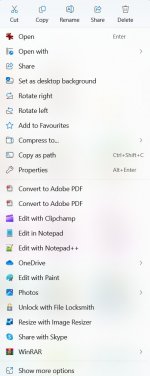
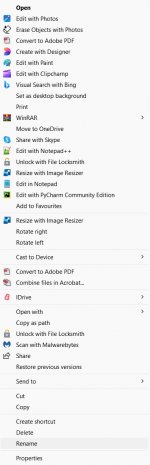
The longest rightclick menu is when I do it on an image file. (And yes OS/2 did it all better!) The first image below is the default menu,
the second is the "...more" options one.

Screenshot 2025-05-15 152548.jpg

Screenshot 2025-05-15 152653.jpg
 
Latest Win 10 update has added a new embuggerance to the lock screen. If you see widgets like weather, video etc appear on your lock screen, go to Settings -> Personalise -> Lock Screen -> "Choose one app to show status on the lock screen" and the default seems to be a greyed cloud icon "Weather and more". Select None.
 
Latest Win 10 update has added a new embuggerance to the lock screen. If you see widgets like weather, video etc appear on your lock screen, go to Settings -> Personalise -> Lock Screen -> "Choose one app to show status on the lock screen" and the default seems to be a greyed cloud icon "Weather and more". Select None.

Thanks! I just noticed that this morning. I could swear I've already turned this off at least once before, but it was back this morning. I don't get "Personalise" under settings, but right click on the display, display settings and typing "lock" in the edit box takes you there too.

I hate crap like that!
 
God, this is a repeat of the ' WIndows XP vs Windows Seven" fuss a few years back.
But in the end, every Windows version will go to the Island of Dead OS systems.
Of course you have the whole retro computing craze to contend with.
 
God, this is a repeat of the ' WIndows XP vs Windows Seven" fuss a few years back.
But in the end, every Windows version will go to the Island of Dead OS systems.
Of course you have the whole retro computing craze to contend with.
Seriously.

Pinning yourself to a particular consumer OS edition is a fool's errand.

Change is inevitable.
 
By File Manager/FM I'm assuming you are meaning "File Explorer"? If so which common options aren't on the first right-click menu in File Explorer?
If I remember rightly, early versions of Windows 11 didn't show Cut, Copy, Delete and possibly one or two others in the main part of the context menu and you needed to click More Options to access those. Now they are available (the top line), presumably from a more recent update.
 
If I remember rightly, early versions of Windows 11 didn't show Cut, Copy, Delete and possibly one or two others in the main part of the context menu and you needed to click More Options to access those. Now they are available (the top line), presumably from a more recent update.

I always thought they showed but rather than being words, the options showed as those stupid symbols. I could easily be wrong though.
 
I always thought they showed but rather than being words, the options showed as those stupid symbols. I could easily be wrong though.
That was my memory as well, but I didn't upgrade from 10 right away so they may not have shown in the earliest release and I just didn't see it.

I did (and do) hate the icons, but at least now they're labeled. But if you're going to label them why not just lose the icons and stick with the labels?

Overall, though, my switch to 11 was pretty painless. And I think it does perform slightly better on the same hardware I was running 10 on.
 
Nobody here worried about the feature that takes a screenshot every three seconds so that Microsoft can do AI stuff with it? It’s currently opt in but how long will that last if MS learns how to monetise it?

Or the fact that MS really wants you to go to a subscription licence model.
 
 
Nobody here worried about the feature that takes a screenshot every three seconds so that Microsoft can do AI stuff with it? It’s currently opt in but how long will that last if MS learns how to monetise it?

Or the fact that MS really wants you to go to a subscription licence model.
If I upgrade my PC to one that supports Recall I might check a bit more to understand where, what and how the data is processed.

Microsoft moved to a subscription model over a decade ago, had to quickly check the exact date and it was 2013 so a dozen years ago.
 
You'll find details in Charles Stross' article in the link above. He was a tech writer before SF and he has tons of credibility in my view though it's potentially outdated.
That's from when it was originally announced, it's been changed since then.
 

Back
Top Bottom