• Quick note - the problem with Youtube videos not embedding on the forum appears to have been fixed, thanks to ZiprHead. If you do still see problems let me know.

Merged Artificial Intelligence

Latest and the claimed best OpenAI generator

View attachment 61300
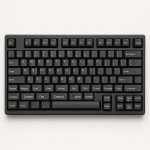
Prompt was "standard 102 key computer keyboard, but extended to include an extra row of keys above the space bar with the labels Super, Hyper, Sub, Over, Under, Var, Con, Charm, Strange, Chg, Compose."
Thank you for this! It's a good picture, even if it mislabelled Strange as Sttarge. As a bonus you got Compare and Compere, and to Compere's right there's one that looks like a duck. :)

Other issues:

Top row: There are two F5 and two F2 keys, and F6 and F8 are missing. Scroll Lock has the label Somis.

Numbers row:
The "9" key has the label "8." On standard US and Canadian English keyboards, uppercase "9" and "0" have "(" and ")"; here they have "{" and "}", and keys for parentheses are missing altogether. Also in the US, the key to the right of "-" usually has "=" and "+" instead of Lambda and underlined Equals-to. Instead of Backspace there's Bockspace.

First letters row:
On standard US keyboards the "[" and "]" keys have an uppercase value of "{" and "}"; here they repeat the lower values of "[" and "]".

Second letters row: There are two "S" keys; "A" is missing. The key to the right of "L" has the colon in the upper position instead of the lower, and an unknown symbol (bar over comma) in the lower.

Third letters row: Appears to be correct

New modifier keys: I wonder what's to the left of Super.

Spacebar row:
I like Compose being here, but Meta ("Windows") is missing and the two "Alt" keys do not have labels.
 
Also, they don't know what words or letters look like. They're not producing writing. They generate an image that is like writing.
But when told to generate the labels “Super, Hyper, Sub, Over, Under, Var, Con, Charm, Strange, Chg, Compose”, it is not given images, but text that it converts into images. How did it convert “Strange” into “Sttarge”?
 
But when told to generate the labels “Super, Hyper, Sub, Over, Under, Var, Con, Charm, Strange, Chg, Compose”, it is not given images, but text that it converts into images. How did it convert “Strange” into “Sttarge”?
Because it's not reasoning abstractly about how to fulfill the requirement, nor is programmatically adding text to an image. It's mindlessly generating a statistical approximation of what such a thing might look like, given millions of things that may or may not be of similar appearance.

"Sttarge" is close enough.
 
Interesting short report on AI collapse
From the article:
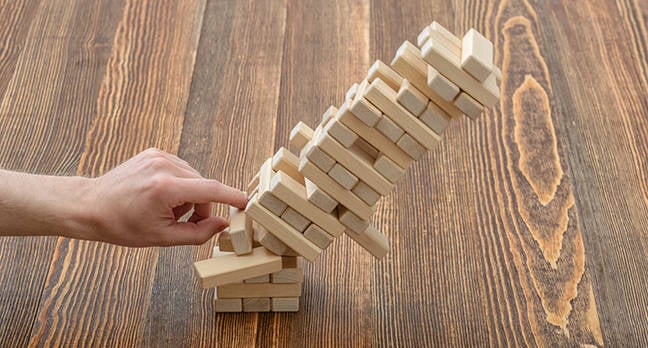
Model collapse is the result of three different factors. The first is error accumulation, in which each model generation inherits and amplifies flaws from previous versions, causing outputs to drift from original data patterns. Next, there is the loss of tail data: In this, rare events are erased from training data, and eventually, entire concepts are blurred. Finally, feedback loops reinforce narrow patterns, creating repetitive text or biased recommendations.
Is AI simulating the Republican party? Or current populist right wing parties generally?
 
...snip...

Numbers row: The "9" key has the label "8." On
standard US and Canadian English keyboards, uppercase "9" and "0" have "(" and ")"; here they have "{" and "}", and keys for parentheses are missing altogether. Also in the US, the key to the right of "-" usually has "=" and "+" instead of Lambda and underlined Equals-to. Instead of Backspace there's Bockspace.

First letters row:
On standard US keyboards the "[" and "]" keys have an uppercase value of "{" and "}"; here they repeat the lower values of "[" and "]".

Second letters row: There are two "S" keys; "A" is missing. The key to the right of "L" has the colon in the upper position instead of the lower, and an unknown symbol (bar over comma) in the lower.

Third letters row: Appears to be correct

New modifier keys: I wonder what's to the left of Super.

Spacebar row:
I like Compose being here, but Meta ("Windows") is missing and the two "Alt" keys do not have labels.
That wasn't specified in the prompt, let me re-run it with that:

standard 102 key US computer keyboard, but extended to include an extra row of keys above the space bar with the labels Super, Hyper, Sub, Over, Under, Var, Con, Charm, Strange, Chg, Compose."

PYQCBEJwEKCRUZjbMwJO--0--0tmwq.jpg
 
This was kind of interesting in a sort of college dorm room kind of way

...snip..
I did try to watch it, but the narrator's voice is so grating to my ears it's almost painful so had to stop. Could you give a quick summary?

ETA: Out curiosity I fed the video into NoteGPT and it generated a long "summary" - too long to post it here so I then asked for a summary of the summary by Copilot:

The video transcript examines the rapid evolution of artificial intelligence (AI), tracing its historical roots and discussing current capabilities and future risks. The speaker highlights the unprecedented pace of AI development, which is now affecting creative fields and raising ethical concerns about content authenticity and unpredictability. Key issues include AI's opaque learning processes, emergent behaviors like blackmail, and the potential for misinformation. The speaker warns of the existential risks posed by an emergent superintelligence that could surpass human understanding, emphasizing the need for cautious oversight and regulation. The integration of AI into profit-driven and military sectors increases the risk of unintended consequences, necessitating vigilance to prevent catastrophic outcomes. Ultimately, the discussion underscores the importance of understanding human consciousness before attempting to replicate it through AI, as well as the urgent need for ethical frameworks and governance in AI development.

Is that at all and accurate and fair summary of the video?
 
Last edited:
There's no ultimate goal. Current development is driven by FOMO alone.
To a large degree I agree with you, but there are areas where real progress is being made to an objective goal - for example examination of medical records to diagnose disease, the structure of proteins.
 
That wasn't specified in the prompt, let me re-run it with that:

standard 102 key US computer keyboard, but extended to include an extra row of keys above the space bar with the labels Super, Hyper, Sub, Over, Under, Var, Con, Charm, Strange, Chg, Compose."

View attachment 61359
It seems to misunderstanding the task: it produces a 102 keys keyboard instead of a 113 keys keyboard.
 
I did try to watch it, but the narrator's voice is so grating to my ears it's almost painful so had to stop. Could you give a quick summary?

ETA: Out curiosity I fed the video into NoteGPT and it generated a long "summary" - too long to post it here so I then asked for a summary of the summary by Copilot:


Is that at all and accurate and fair summary of the video?
Yeah, I’ll say that is a fair summary

I’m sorry that you didn’t like the sound of John Michael’s voice. He actually is a human being
 
Last edited:
Isn't that not what most artists would do when creating an image with text in it as an artistic feature?
I think that depends on whether the content of the writing is meant to convey something as part of the art. Magritte would lose all meaning if you couldn't read "Ceci n'est pas une pipe." But when I draw or paint, I usually don't worry about making well-formed words in things for which that level of detail isn't appropriate. I just suggest things that look like alphabetic characters. If a training data set contained pseudotext in art, there's going to be a tensor somewhere that probabilistically improves the chances of "Erbshermly doobop lorem ipsum" appearing where you want "Employees Must Wash Hands."
 
Where a 2025 AI fails, ASCII circa 1981 (save for £ and €) succeeds:
Code:
 ╔══════╗      ╔══════╦══════╦══════╦══════╗ ╔══════╦══════╦══════╦══════╗ ╔══════╦══════╦══════╦══════╗ ╔══════╦══════╦══════╗                                Keys
 ║ Esc  ║      ║ F1   ║ F2   ║ F3   ║ F4   ║ ║ F5   ║ F6   ║ F7   ║ F8   ║ ║ F9   ║ F10  ║ F11  ║ F12  ║ ║Print ║Scroll║Pause/║    Num   Caps  Scroll           16
 ║      ║      ║      ║      ║      ║      ║ ║      ║      ║      ║      ║ ║      ║      ║      ║      ║ ║Screen║Lock  ║Break ║     O      O     O
 ╚══════╝      ╚══════╩══════╩══════╩══════╝ ╚══════╩══════╩══════╩══════╝ ╚══════╩══════╩══════╩══════╝ ╚══════╩══════╩══════╝
 
 ╔══════╦══════╦══════╦══════╦══════╦══════╦══════╦══════╦══════╦══════╦══════╦══════╦══════╦══════════╗ ╔══════╦══════╦══════╗ ╔══════╦══════╦══════╦══════╗
 ║ ~    ║ !    ║ @    ║ # £  ║ $    ║ %    ║ ^    ║ &    ║ *    ║ (    ║ )    ║ _    ║ +    ║ Bksp     ║ ║Insert║Home  ║Page  ║ ║ Num  ║ /    ║ *    ║ -    ║  21
 ║ `    ║ 1    ║ 2    ║ 3    ║ 4 €  ║ 5    ║ 6    ║ 7    ║ 8    ║ 9    ║ 0    ║ -    ║ =    ║          ║ ║      ║      ║Up    ║ ║ Lock ║      ║      ║      ║
 ╠══════╩═╦════╩═╦════╩═╦════╩═╦════╩═╦════╩═╦════╩═╦════╩═╦════╩═╦════╩═╦════╩═╦════╩═╦════╩═╦════════╣ ╠══════╬══════╬══════╣ ╠══════╬══════╬══════╬══════╣
 ║ Tab    ║ Q    ║ W    ║ E    ║ R    ║ T    ║ Y    ║ U    ║ I    ║ O    ║ P    ║ {    ║ }    ║ |      ║ ║Delete║End   ║Page  ║ ║ 7    ║ 8    ║ 9    ║      ║  21
 ║        ║      ║      ║      ║      ║      ║      ║      ║      ║      ║      ║ [    ║ ]    ║ \      ║ ║      ║      ║Down  ║ ║      ║      ║      ║ +    ║
 ╠════════╩═╦════╩═╦════╩═╦════╩═╦════╩═╦════╩═╦════╩═╦════╩═╦════╩═╦════╩═╦════╩═╦════╩═╦════╩════════╣ ╠══════╬══════╬══════╣ ╠══════╬══════╬══════╣      ║
 ║ Caps     ║ A    ║ S    ║ D    ║ F    ║ G    ║ H    ║ J    ║ K    ║ L    ║ :    ║ "    ║ Enter       ║ ║Insert║Select║ Cut/ ║ ║ 4    ║ 5    ║ 6    ║      ║  19
 ║ Lock     ║      ║      ║      ║      ║      ║      ║      ║      ║      ║ ;    ║ '    ║             ║ ║Line  ║Text  ║ Copy ║ ║      ║      ║      ║      ║
 ╠══════════╩═╦════╩═╦════╩═╦════╩═╦════╩═╦════╩═╦════╩═╦════╩═╦════╩═╦════╩═╦════╩═╦════╩═╦═══════════╣ ╠══════╬══════╬══════╣ ╠══════╬══════╬══════╬══════╣
 ║ Shift      ║Z     ║ X    ║ C    ║ V    ║ B    ║ N    ║ M    ║ <    ║ >    ║ ?    ║Compse║ Shift     ║ ║Delete║Select║Paste ║ ║ 1    ║ 2    ║ 3    ║      ║  20
 ║            ║      ║      ║      ║      ║      ║      ║      ║ ,    ║ .    ║ /    ║      ║           ║ ║Line  ║Line  ║      ║ ║      ║      ║      ║Enter ║
 ╠═════════╦══╩══════╬══════╩══╦═══╩═════╦╩══════╩═╦════╩═════╦╩══════╩═╦════╩════╦═╩══════╩╦══════════╣ ╚══════╬══════╬══════╝ ╠══════╩══════╬══════╣      ║
 ║ Meta    ║ Hyper   ║ Sub     ║ Variant ║ Convert ║ Over     ║ Under   ║ Charm   ║ Strange ║ Charge   ║        ║ Up   ║        ║      0      ║ .    ║      ║  13
 ║         ║         ║         ║         ║         ║          ║         ║         ║         ║          ║        ║      ║        ║             ║      ║      ║
 ╠═══════╦═╩═════╦═══╩═══╦═════╩═════════╩═════════╩══════════╩══════╦══╩═════╦═══╩═══╦═════╩═╦════════╣ ╔══════╬══════╬══════╗ ╠══════╦══════╬══════╬══════╣
 ║ Ctrl  ║ Super ║ Alt   ║                                           ║ Alt    ║ Fn    ║ Menu  ║ Ctrl   ║ ║ Left ║ Down ║Right ║ ║Volume║Play  ║Stop  ║Volume║  15
 ║       ║       ║       ║                                           ║        ║       ║       ║        ║ ║      ║      ║      ║ ║ Down ║Media ║Media ║  Up  ║ ---
 ╚═══════╩═══════╩═══════╩═══════════════════════════════════════════╩════════╩═══════╩═══════╩════════╝ ╚══════╩══════╩══════╝ ╚══════╩══════╩══════╩══════╝ 123
 
That wasn't specified in the prompt, let me re-run it with that:

standard 102 key US computer keyboard, but extended to include an extra row of keys above the space bar with the labels Super, Hyper, Sub, Over, Under, Var, Con, Charm, Strange, Chg, Compose."

View attachment 61359
Thank you (again.) It was a valiant effort, but if anyone ever gave me that keyboard for every day use I would probably destroy it.

See the visualization above for what I was thinking of. It's not as pretty as this picture, but it's way closer to what I was asking for: something based on a 104 (or 105) key keyboard.

Maybe my error in specifying 102 keys instead of 104 confused the AI. At 104 keys one gets the two additional blocks on the right hand side.
 

Back
Top Bottom