
• Quick note - the problem with Youtube videos not embedding on the forum appears to have been fixed, thanks to ZiprHead. If you do still see problems let me know.

Recycler Virus - Help

Patricio Elicer

Obsessed with Reality
Joined
Aug 6, 2001
Messages
4,633
Location
Santiago, Chile
So I got this virus on my comp. I've read it spreads through external drives, and that's precisely what happened to me. I inserted an infected pendrive (unknowingly) and it immediatly infected all my other external drives. And couriusly only the externals are infected, not the C drive.

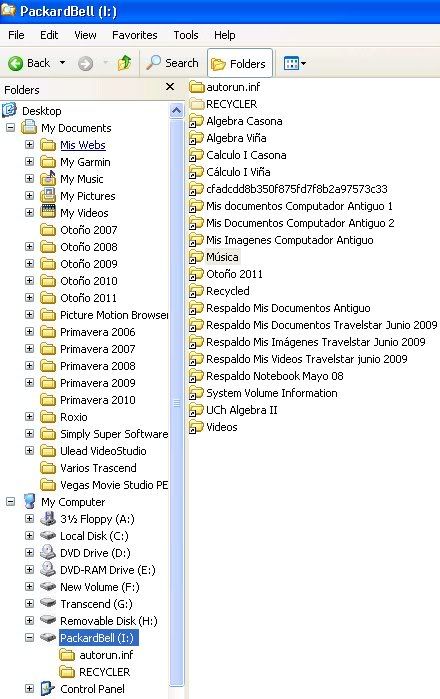
So far the infection is not so severe, but very annoying. Basically all main folders icons, not single files, in a given drive appear with a small arrow in the bottom left, as if they were moved to somewhere else. Also, the autorun.inf and RECYCLER folders are automtically created after reboot.

Applications like Excel or Word don't recognize them, so I can't open them from there. I can have access to sub-folders and files from Windows Explorer, however.

I've seen tutorials on YT and searched the web on how to remove it. It looks like a common problem, but I haven't been able to remove it.

So anyone here had experience with this?, any help?

This is how one of my external drives look like in windows explorer.

Thanks.
Recyclervirus.jpg
 
Last edited:
Yes, I have it in the desktop. Maybe I don't know how to use it?. Upon double clicking on the icon, a process starts, finish, and the window closes. Nothing more. No other indication on how to preceed next.
 
Which anti virus program are you using?

I would highly suggest getting a livecd with antivirus on it, update the virus definition, and scan/repair.

http://www.kaspersky.com/virusscanner <- Kaspersky has an ISO here. I have never used it so i don't know how it works, but it should do the job.

The key here is to remove the virus without starting windows(or any other program currently) on your computer.

REMEMBER: To install and upgrade antivirus on your computer before reattaching the infected drives. Also make sure your windows is completely up to date and 100% patched. Then add and scan/clean your external drives one at a time.

1 - Disconnect all drives except windows system drive, and cold boot computer.

2 - Boot the livecd antivirus and run it and go to step 3.
OR
2a - Boot into safe mode with networking (press F8 after the BIOS but before the windows loading logo, and select "safe mode with networking" from the list.
AND
2b - Use 2 different online scanners.(first one, then the other) fx: http://housecall.trendmicro.com/ and http://www.f-secure.com/en_EMEA-Labs/security-threats/tools/online-scanner

3 - Reboot and install and upgrade antivirus

4 - Update your windows till it can't find anymore patches.

5 - Rescan your system and make sure it is not infected.

5a - I would also suggest installing something like spybot search and destroy

6 - Insert and scan your external drives one at a time.

Hopefully this should solve it.
 
Last edited:
Yes, I have it in the desktop. Maybe I don't know how to use it?. Upon double clicking on the icon, a process starts, finish, and the window closes. Nothing more. No other indication on how to preceed next.

Um, that is not good, BTW you use Combofix at your own risk. I have had it blow up one machine out of hundreds.

Here is the download link for Flash Disinfector, a great tool!
http://download.bleepingcomputer.com//sUBs/Flash_Disinfector.exe

It means that whatever infected your machine is rather good, I recommend that you get an account and start a thread here, after running the scans they ask for in the sticky note.

Virus, Trojan, Spyware, and Malware Removal Logs

Sticky:
Preparation Guide For Use Before Using Malware Removal Tools and Requesting Help

If you don't like that site there are many others Malwarebytes, Geeks to Go, etc...

If you still want to do it on your own

1. Download
Rkill
Tdss Killer
SAS Potable

all three to the desktop of an adminstrative account.

2. Reboot in Safe Mode
Run Rkill
Run TDSS Killer
Run SAS Portable
reboot

Now if Rkill won't run in safe mode you may have to download the versions of Rkill labeled rkill.com, ieexplorer.exe and try again, Rkill is meant to stop most know bad processes

3. Run Rkill in normal mode
Download MBAM Free
Install, update and scan

Now Rkill should allow you to use the other programs and they should work, and if it is something other than TDSS then a different root kit tool might have to be tried.

Good luck, I am still a junior trainee, you may have to use Combofix, after running Rkill, in safe mode, be sure to back up your data.
 
Which anti virus program are you using?

I would highly suggest getting a livecd with antivirus on it, update the virus definition, and scan/repair.

http://www.kaspersky.com/virusscanner <- Kaspersky has an ISO here. I have never used it so i don't know how it works, but it should do the job.

The key here is to remove the virus without starting windows(or any other program currently) on your computer.

REMEMBER: To install and upgrade antivirus on your computer before reattaching the infected drives. Also make sure your windows is completely up to date and 100% patched. Then add and scan/clean your external drives one at a time.

1 - Disconnect all drives except windows system drive, and cold boot computer.

2 - Boot the livecd antivirus and run it and go to step 3.
OR
2a - Boot into safe mode with networking (press F8 after the BIOS but before the windows loading logo, and select "safe mode with networking" from the list.
AND
2b - Use 2 different online scanners.(first one, then the other) fx: http://housecall.trendmicro.com/ and http://www.f-secure.com/en_EMEA-Labs/security-threats/tools/online-scanner

3 - Reboot and install and upgrade antivirus

4 - Update your windows till it can't find anymore patches.

5 - Rescan your system and make sure it is not infected.

5a - I would also suggest installing something like spybot search and destroy

6 - Insert and scan your external drives one at a time.

Hopefully this should solve it.

Always good!
 
Combofix is definitely in the strong medicine category.

Very effective, but there are infections which will prevent it (or pretty much any security program) from running until you kill the offending process.

It's handy to have a spare PC you can backup your data to first, in case things go wrong.
 
That thing with the folders and the small arrows...

I noticed after an infection (which I'm pretty sure I cleared) the same thing. I also noticed it had to do with the file permissions on the folders. When I opened up properties on one, there was an added permissions for -- everyone and "special". By deleting the user called "everyone" it went back to normal.

I don't really know if changing the permissions was a good idea though.
 
Thanks for the tips, folks.

I've made some progress so far, but haven't removed the problem.

I disconnected all external drives, uninstalled my old antivirus program, and installed Norton 2011. Norton did discover some threats, and removed them, but the problem kept.

But I discovered that all those folders with the small arrow, are hidden. In Folder Options I selected "Show Hidden Files and Folders", and un-selected "Hide Protected Operating System Files", and the folders showed up again, in a washed out color (both actions were needed).

So basically I can work with those folders normally with any application, but obviously something is not right. I think the problem has to do with that RECYCLER folder which is in the C drive. I havent' been able to delete it. The same folder appears in the external drives, I can delete it, but regenerates on rebooting.

So for now my main concern is that I won't be able to connect any external drive on my comp, on the risk of infecting them with the problem, and so spread the infection to other comps.

I used the Flash Disinfector BTW, but didn't do any good.

Anyone knows how to remove that RECYCLER folder from the C drive?
 
Last edited:
Correction: Flash Disinfector did work,... at least to a certain extent.

It creates a "Autorun.inf" folder in the drive, that protects it against future attacks of the kind. So new folders are safe (although the virus is still in the main system). But the big question remains: is it safe enough (a pendrive) for use in other machines?
 
Thanks David. No the machine doesn't act sick, but it is sick. I know because all main folders in external drives show up as hidden, which is not normal.

But the good thing is that the Flash Disinfector blocked the virus from affecting the externals. I've done tests, all folders created after FD look fine; also, I deleted all those folders marked with a small arrow, and didn't come back (as opposed to pre-FD times).

My main concern now is to know if the pendrive is safe to insert in other machines. Probably I will end up buying a fresh one.

I'll try your link now.

EDIT: Nice, now all folders in my externals (except for one drive, curious) look normal. Big progress, I'll run Norton antivirus now in safe mode to see what happens. Thanks again.
 
Last edited:
I would recommend scanning the pen drive with a number of scanners, and if your machine acts slow, redirects and the like. I would do the Rkill and scan routine.

Can you do online scans yet like the ones Tobias the Viking mentioned, those are a good place to start. They won't always or usually scan pen drives but they will scan your machine. Norton should scan the pen drive.
 
This looks like a Trojan loader I see a lot at work.
The Autorun.inf file loads and runs an executable that creates a registry entry which runs an executable on bootup. The EXE file has a random name and is hidden by default.

If you don't have it, go to Sysinternals (aka Winternals.) Download Autoruns.exe and unpack the zip.
In Windows explorer, make sure system and hidden files are displayed.

Start the PC in safe mode (with networking, though you probably don't need that).
That will stop the boot run executable. It's now possible to delete the executable, if you can find it. Look for a hidden folder that should now be visible with a wierd name.
Run autoruns.exe and delete any startup references to that file.
Run Regedit. Hit F3 and search for any key that runs or refers to that executable file.
At each instance, delete the relevant key.
Run through the registryt at least twice to be sure you get them all.
Reboot. It's slow and a pain in the neck, but generally effective.

These infections are so common at work, I now use my Linux netbook to check all USB drives, before putting them in a windows box.
 
Last edited:

Back
Top Bottom