
You are using an out of date browser. It may not display this or other websites correctly.
You should upgrade or use an alternative browser.
You should upgrade or use an alternative browser.
IRQ Conflicts
- Thread starter Cobalt
- Start date
-
- Tags
- irq conflicts windows
BigAl
Philosopher

- Joined
- Jun 9, 2007
- Messages
- 5,397
What problems are you having?
Can you give the make and model of the machine, the operating system, and what hardware you've added since you took it out of the box it came in.
A tiny utility called SIW (Software information for Windows) will inventory all your hardare and software and print out a report than you can post
http://www.gtopala.com/
I haven't screwed with IRQs on a desktop machine since the ISA buss went the way of the Dodo and is not missed.
Can you give the make and model of the machine, the operating system, and what hardware you've added since you took it out of the box it came in.
A tiny utility called SIW (Software information for Windows) will inventory all your hardare and software and print out a report than you can post
http://www.gtopala.com/
I haven't screwed with IRQs on a desktop machine since the ISA buss went the way of the Dodo and is not missed.
Cobalt
Tobikan Judan

- Joined
- Apr 2, 2008
- Messages
- 1,685
It's an Alienware.
AMD Athlon 64 X2 Dual Core Processor 3800+, 2 gigs of ram, Asus A8N-SLI DELUXE Motherboard, ATI Radeon X1800 Series, SAMSUNG SP2504C HDD, NEC DVD_RW, Creative SB Audigy 2 ZS, ND-3550A. I'm pretty sure my drivers are all up to date.
And I dual boot between XP Pro SP2 and Ubuntu (which has its own issues at the moment, so I'm pretty much going with XP til Hardy's released as stable)
Conflicts are:
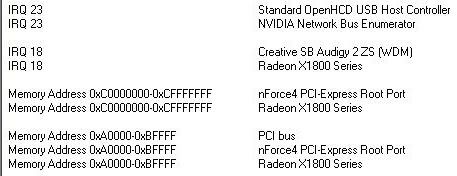
I was researching the issue some soundblaster cards have, which has been dubbed the squeal of death. Total system lockup accompanied by a lovely high pitched screeching noise. Occasionally had a BSOD but now just a lockup and a noise. Overall, for the people it's affected, it's happened in a variety of situations, mine happens to be when playing Flight Simulator X. On their own forums a user said that IRQ conflicts can be part of the problem between the SB and the rest of the hardware. But among other things, there's a lot of other potential issues, and the only real solution it seems is to ditch the Creative card. Some others say its a BIOS thing.
At the end of the day, what I know about adding or removing hardware amounts to: nothing. So I don't know if fixing these conflicts will remedy the situation.
AMD Athlon 64 X2 Dual Core Processor 3800+, 2 gigs of ram, Asus A8N-SLI DELUXE Motherboard, ATI Radeon X1800 Series, SAMSUNG SP2504C HDD, NEC DVD_RW, Creative SB Audigy 2 ZS, ND-3550A. I'm pretty sure my drivers are all up to date.
And I dual boot between XP Pro SP2 and Ubuntu (which has its own issues at the moment, so I'm pretty much going with XP til Hardy's released as stable)
Conflicts are:
I was researching the issue some soundblaster cards have, which has been dubbed the squeal of death. Total system lockup accompanied by a lovely high pitched screeching noise. Occasionally had a BSOD but now just a lockup and a noise. Overall, for the people it's affected, it's happened in a variety of situations, mine happens to be when playing Flight Simulator X. On their own forums a user said that IRQ conflicts can be part of the problem between the SB and the rest of the hardware. But among other things, there's a lot of other potential issues, and the only real solution it seems is to ditch the Creative card. Some others say its a BIOS thing.
At the end of the day, what I know about adding or removing hardware amounts to: nothing. So I don't know if fixing these conflicts will remedy the situation.
BigAl
Philosopher
- Joined
- Jun 9, 2007
- Messages
- 5,397
Shared interrupts have been common for a long time. I wouldn't presume that what you see is or is not the cause and, as I said, I haven't needed to screw with this on any modern hardware. Good luck. I hope to learn from other post on this.
Consider running Linux under a virtual machine. Microsoft Virtual PC is free and VMWare may be, I've lost track. You might find a ubuntu "appliance" (free) pre-set up for you to customize as needed.
Dual-booting is so-1990s.
Consider running Linux under a virtual machine. Microsoft Virtual PC is free and VMWare may be, I've lost track. You might find a ubuntu "appliance" (free) pre-set up for you to customize as needed.
Dual-booting is so-1990s.
BigAl
Philosopher
- Joined
- Jun 9, 2007
- Messages
- 5,397
That's fine and good, but IMO, becoming familiar with VMs is good, to, and you still get to install Ubunto and learn that, too, if you want to. Wyth a VM, you get to run on a simulated bog-standard motherboard and are not subject to being on the bleeding edge for you real hardware.
VM is really the way to bo to learn a new OS because you can roll back to any prior point and you can bounce between the new OS and the old own without a reboot.
VM is really the way to bo to learn a new OS because you can roll back to any prior point and you can bounce between the new OS and the old own without a reboot.
grmcdorman
Graduate Poster
- Joined
- Mar 21, 2007
- Messages
- 1,458
VMware Server is free, as is VMware Player. The latter can only run pre-created VMs, though; it can't create new ones.
There is indeed an Ubuntu "appliance" (pre-created VM): Hardy Heron (latest) - along with other Linux distros including Red Hat Fedora, Open SUSE, and others (see http://www.vmware.com/appliances/ for a full list of appliances).
ETA: The canonical "live CD"* distribution (although it's DVD these days) is Knoppix.
* A live CD (or DVD) is a CD you can boot and run an operating system from without affecting your hard drive - in theory you could even have no hard drive.
There is indeed an Ubuntu "appliance" (pre-created VM): Hardy Heron (latest) - along with other Linux distros including Red Hat Fedora, Open SUSE, and others (see http://www.vmware.com/appliances/ for a full list of appliances).
ETA: The canonical "live CD"* distribution (although it's DVD these days) is Knoppix.
* A live CD (or DVD) is a CD you can boot and run an operating system from without affecting your hard drive - in theory you could even have no hard drive.
Last edited:
a_unique_person
Director of Hatcheries and Conditioning

I think you can manually assign IRQs if you need to, the sound card might not like sharing. IIRC, this is can be done in the BIOS, or on the tab for the device in the "Device manager" panel.
a_unique_person
Director of Hatcheries and Conditioning
Jeepers, a whole 258 pages of posts on this MOBO. http://www.hardwareanalysis.com/content/topic/38623/
Have you updated the BIOS?
Asus A8N-SLI FAQ – Configuration
***UPDATE 05/04/2005 - new BIOS and drivers added***
Introduction
The Asus A8N-SLI Deluxe is one of the first SLI motherboards that made it to the market, with initial availability just before the end of 2004. All the A8N-SLI motherboards that have shipped and are currently shipping, up to this date, are based on the same design and all carry the same rev. 1.02 version number. Despite the motherboard revision number being identical many of these boards ship with a different BIOS. This is one of the biggest problems and cause for many issues across the board as the initial BIOS it shipped with, 1001, lacks many of the improvements found in later BIOS versions. We’ll outline below how to go about making sure a system featuring the A8N-SLI is set up properly starting with picking parts and the simple procedure of upgrading the BIOS to the latest version.
Have you updated the BIOS?
Cobalt
Tobikan Judan
- Joined
- Apr 2, 2008
- Messages
- 1,685
Jeepers, a whole 258 pages of posts on this MOBO. http://www.hardwareanalysis.com/content/topic/38623/
Have you updated the BIOS?
Nope, my knowledge is limited.
a_unique_person
Director of Hatcheries and Conditioning
Nope, my knowledge is limited.
Here is their support home page.
There is a pretty new BIOS update there.
http://support.asus.com/download/download.aspx?SLanguage=en-us
You will have to enter the details to get to the downloads part.
You want a Motherboard, Socket 939, A8N-SLI Deluxe.
I would download the ASUS update program by itself, and run that first. If it's anything like the Gigabyte program, you just run it, and it downloads and installs all the updates by itself.
There is also the BIOS, that may not be handled automatically.
You would want the winflash procedure, by the looks of it.
It is documented here
http://support.asus.com/technicaldocuments/technicaldocuments.aspx?root=198&SLanguage=en-us
Beerina
Sarcastic Conqueror of Notions

- Joined
- Mar 3, 2004
- Messages
- 34,323
Shared interrupts have been common for a long time. I wouldn't presume that what you see is or is not the cause and, as I said, I haven't needed to screw with this on any modern hardware. Good luck. I hope to learn from other post on this.
One would think dual 64-bit processor machines would be "modern enough." Creative needs to get with the picture.
You can look at the IRQ list and see if the sound card shares one with another thing. I wouldn't go around moving it (or the other thing) to another one though. That can fubar your computer if you're not careful, which is to say, not sure if the hardware can handle a switch this way.
I would also check the Creative web site as well as Alienware. They would probably be more motivated to trace the problem since Alienware is a premeir gaming company they're probably proud to loudly do business with.